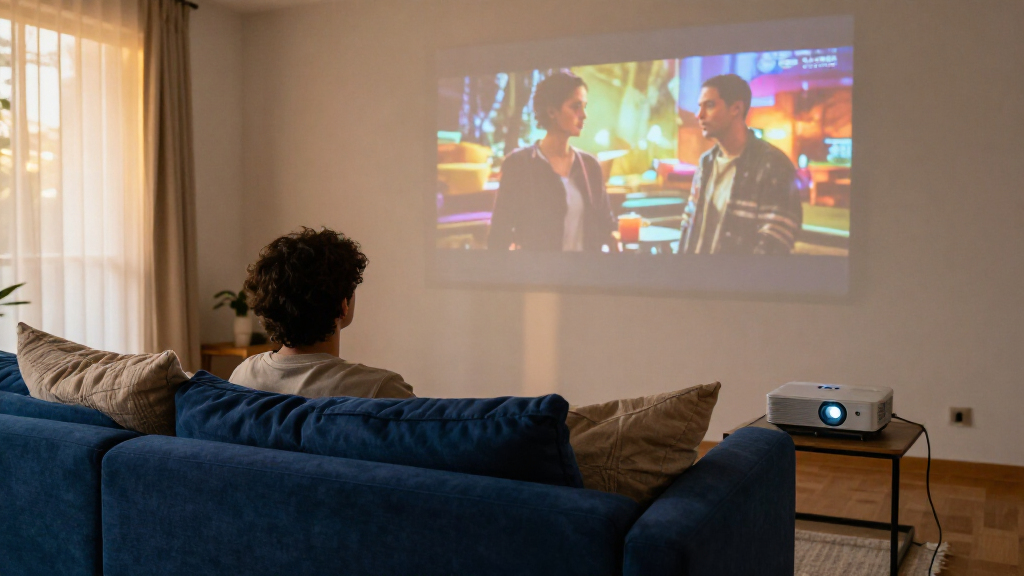
Choosing a home theater projector is often a room-planning decision before it is a picture-quality decision. Long-throw models project from across the room, commonly from a ceiling mount or rear shelf; ultra-short-throw (UST) models sit just inches from the screen. Both can create a large image, but they ask for different room layouts and budgets.

Get business pricing on your home office setup
- Business-only prices and quantity discounts
- Tax-exempt purchasing
- Multiple users, one account, clear invoices

Epson Home Cinema 980 1080p 3LCD Projector
- ✔ Native resolution: 1920 × 1080
- ✔ Display technology: 3-chip 3LCD
- ✔ Brightness: 4,000 lumens color and white

NexAurea Smart Projector, Native 1080p with 4K Decoding, Built-In Apps, Wi-Fi 6 and Bluetooth 5.4
- ✔ Native resolution: 1080p
- ✔ Video decoding: 4K
- ✔ HDR: HDR10+

HAPPRUN 1080p Projector with Licensed Google TV and Bluetooth
- ✔ Native resolution: 1920 × 1080
- ✔ Video decoding: 4K
- ✔ Brightness: 400 lm; maximum white brightness listed as 350 ANSI lumens
Long-throw projectors are usually the stronger value for a dedicated theater, especially when the room can accommodate a fixed screen and a carefully positioned projector. UST models suit living rooms where a ceiling mount is impractical, people walk through the image path, or the projector needs to sit near the wall. The central tradeoff is lower cost and greater placement distance against a compact setup that may cost more and demand a very flat screen and careful alignment.
At a Glance
| Criteria | Long-throw home theater projectors | Ultra-short-throw home theater projectors | Winner |
|---|---|---|---|
| Typical placement | Several feet from the screen; often ceiling-mounted or placed on a rear shelf | Sits close to the wall, typically on a low cabinet | B |
| Room and furniture fit | Needs a clear projection path and a suitable mounting or shelf position | Keeps the projector out of the main room and avoids people crossing the beam | B |
| Screen requirements | Works with many fixed screens; screen choice still affects contrast and uniformity | Best paired with a flat, tensioned screen; an ambient-light-rejecting UST screen can add substantial cost | A |
| Picture and ambient light | Strong results in a darkened room; brightness and contrast vary by model | Can work well in a living room with suitable brightness and screen, though daylight still washes out images | Depends |
| Installation and alignment | Longer throw distance and mount position require planning; keystone correction can reduce image quality | No ceiling mount, but small placement errors show clearly and setup can be sensitive | Depends |
| Cost and system value | Usually lower projector cost for a given performance level; may require mount and installation | Projector can cost more, and a suitable screen raises total system cost; simpler room integration may save installation effort | A |
| Best use case | Dedicated theater rooms and buyers seeking strong image value | Shared living rooms and rooms that cannot support a distant projector | Depends |
Epson Home Cinema 980 1080p 3LCD Projector
The Epson Home Cinema 980 earns the top spot because its 4,000-lumen color and white brightness address a real home theater challenge: not every room can be made fully dark. Its Full HD 3LCD design is a more compelling fit for flexible living-room viewing than the lower listed brightness of the HAPPRUN. Epson also gives us two HDMI ports, so a game console and streaming device can stay connected at once, while the USB port can power a streaming device.This is the most focused pick for buyers who value brightness and straightforward connections over built-in smart features. Unlike HAPPRUN and NexAurea, the Epson description does not include an onboard streaming platform, so we should plan on connecting a compatible source. Its built-in speaker can help with quick setup, but the supplied specs do not suggest the same audio emphasis as NexAurea’s dual 25W speakers and eARC. The projector supports images up to 337 inches, though a very large image is most useful when the room and viewing distance can accommodate it. We should also note that the listed throw distance is 1 to 9 feet, so placement needs to suit that range.Choose Epson when more brightness is the priority and we want a familiar HDMI-based setup. Skip it if integrated streaming and flexible automated placement matter more than brightness; NexAurea or HAPPRUN better match those needs on paper.
Pros:
- 4,000 lumens of both color and white brightness, the highest listed brightness in this comparison.
- Native 1920 × 1080 resolution with 3-chip 3LCD technology.
- Two HDMI ports support multiple connected sources.
- USB power, a built-in speaker, and portable form support a quick, repositionable setup.
Cons:
- No built-in streaming platform is specified, so streaming requires a connected device.
- The supplied throw-distance range is 1 to 9 feet, which may constrain placement.
- A built-in speaker is convenient, but the feature list is less audio-focused than NexAurea’s.
Best for: Viewers setting up a 1080p home theater in a room with some ambient light who want two HDMI connections and high stated brightness.
Not ideal for: Buyers who want built-in streaming apps, automatic focus and correction, or a projector selected primarily for powerful onboard audio.
Bottom line: For a home theater that needs high stated brightness and simple source switching, the Epson is the strongest all-around fit in this group.
“For a home theater that needs high stated brightness and simple source switching, the Epson is the strongest all-around fit in this group.”
NexAurea Smart Projector, Native 1080p with 4K Decoding, Built-In Apps, Wi-Fi 6 and Bluetooth 5.4
Where Epson makes the clearest case on brightness, NexAurea makes its case on convenience. Auto focus, 6D keystone correction, obstacle avoidance, and electronic zoom give us several ways to adapt the image when the projector has to sit off-center or the room layout changes. Those adjustments can make a flexible living room easier to use than a fixed, carefully aligned setup. Built-in apps and Wi-Fi 6 also reduce the number of separate devices required for streaming.Its standout home theater feature is dual 25W speakers with eARC. That is a more substantial built-in audio specification than the 5W speaker listed for HAPPRUN, and eARC allows connection to a compatible external audio system. The projector also lists Dolby Audio, DTS decoding, and two-way Bluetooth 5.4. Those options make it the most audio-oriented entry here, though we should check compatibility for wireless connections and eARC before building a setup around them.The main limitation is that the supplied specs give no brightness figure, so we cannot place it confidently for a room with ambient light against Epson’s 4,000-lumen rating. Its native resolution is 1080p; 4K decoding means it can handle a 4K source, not display native 4K detail. Compared with HAPPRUN, NexAurea offers more extensive setup and audio features, but buyers who mainly want an included streaming interface may find HAPPRUN’s licensed Google TV easier to evaluate and understand.
Pros:
- Auto focus, 6D keystone correction, obstacle avoidance, and electronic zoom support flexible placement.
- Dual 25W speakers and eARC provide built-in audio and an expansion path.
- Built-in apps, Wi-Fi 6, and two-way Bluetooth 5.4 cover several common streaming and audio needs.
- HDR10+ and 4K decoding support compatible source content.
Cons:
- Native display resolution is 1080p, not 4K.
- No brightness figure is included in the supplied specifications, making room-light comparisons difficult.
- eARC and wireless audio features depend on compatible devices.
Best for: Home theater buyers who need setup flexibility, built-in streaming, and a stronger onboard audio feature set, especially in a room they can darken.
Not ideal for: Viewers who need a clearly stated brightness rating to choose for a brighter room, or who require native 4K projection.
Bottom line: NexAurea is the most adaptable and audio-equipped option here, provided its unspecified brightness suits our room.
“NexAurea is the most adaptable and audio-equipped option here, provided its unspecified brightness suits our room.”
HAPPRUN 1080p Projector with Licensed Google TV and Bluetooth
The HAPPRUN 1080p Projector is the most direct choice for buyers who want streaming ready to go. Licensed Google TV and voice control put apps and search on the projector itself, so we do not need to dedicate an HDMI port to a separate streaming stick. That makes it simpler to get started than the Epson, whose listed USB port is for power rather than video input. HAPPRUN also has Wi-Fi 6, Bluetooth 5.2, HDMI, USB, and a 3.5 mm jack, giving us several ways to connect devices and audio.For a home theater, however, brightness is the tradeoff. Its specifications list 400 lm and maximum white brightness of 350 ANSI lumens. Those are the lowest stated brightness figures in this lineup, and the discrepancy means buyers should confirm which rating applies to their intended comparison. It is therefore a better fit for a darkened room and a moderate screen size than for a living room where lights stay on. The Epson is the more convincing option when room light is unavoidable.HAPPRUN accepts 4K decoding, but its native image is still 1920 × 1080, like Epson’s. Its 5W speaker and image-size range up to 300 inches support an all-in-one start, although the NexAurea offers substantially more listed speaker power and placement aids. HAPPRUN’s multiple mounting options—ceiling, tabletop, tripod, or wall—add flexibility, but a large maximum image does not by itself establish how bright or detailed that image will look. Choose it for the convenience of Google TV; choose NexAurea for more setup and audio features.
Pros:
- Licensed Google TV and voice assistant provide built-in streaming and voice control.
- Wi-Fi 6, Bluetooth 5.2, HDMI, USB, and a 3.5 mm jack support varied connections.
- Ceiling, tabletop, tripod, and wall mounting options allow different room setups.
- Native 1080p resolution with support for image sizes up to 300 inches.
Cons:
- The listed brightness figures are modest and differ: 400 lm and 350 ANSI lumens.
- 4K is decoded as a source format; the native display resolution remains 1080p.
- The built-in speaker is rated at 5W, below NexAurea’s dual 25W speaker specification.
Best for: Viewers who want a native 1080p projector with licensed Google TV and voice control for streaming in a darkened room.
Not ideal for: Buyers projecting in ambient light, seeking high stated brightness, or expecting native 4K detail from 4K decoding.
Bottom line: HAPPRUN is the easiest pick for built-in Google TV, as long as we can darken the room and accept its lower, inconsistently listed brightness.
“HAPPRUN is the easiest pick for built-in Google TV, as long as we can darken the room and accept its lower, inconsistently listed brightness.”
As an Amazon Associate we earn from qualifying purchases.
Key Differences
The largest difference is where each projector lives. A long-throw model needs a clear path between the projector and screen, so room depth, seating, ceiling structure, and foot traffic matter. Once mounted and aligned, it can disappear into a dedicated theater. A UST model trades that distance for a position near the screen, which makes it easier to fit into many living rooms and avoids a beam crossing the seating area.
That convenience does not automatically make UST the simpler or cheaper system. Its image geometry is sensitive to placement, and a screen designed for UST projection may be needed to control reflections and preserve contrast. Long-throw models more often offer a lower entry cost and broader screen flexibility, but installation can require a mount, cable routing, and careful distance calculations. In either category, image quality depends on the specific projector, screen, room lighting, and source material.
For most buyers building a theater from scratch, long-throw is the value-oriented default. Choose UST when its near-wall placement solves a real room problem or makes the system more usable every day. Paying more for that layout makes sense when it avoids an awkward mount, protects the image from foot traffic, or lets a projector coexist naturally with living-room furniture.
Detailed Comparison
Placement and room fit (Ultra-short-throw home theater projectors wins — major)
UST wins for rooms where a ceiling mount or rear shelf is difficult: it sits close to the screen and leaves the main projection path clear. That is a major practical advantage in a shared living room, especially when people move between the projector and screen. Long-throw wins when the room already has adequate depth and a suitable mounting point; it can be installed overhead and kept away from furniture. The gap is major when room layout is constrained and minor in a dedicated theater built around the screen.
Screen choice (Long-throw home theater projectors wins — moderate)
Long-throw wins on flexibility. Many standard fixed screens can work, subject to the projector’s throw and the screen’s gain and surface characteristics. UST systems are more demanding because the steep projection angle can reveal screen waviness or surface imperfections. A flat, tensioned screen is often a safer pairing, and a UST-specific ambient-light-rejecting screen may improve daytime viewing at extra cost. The difference is moderate if a suitable screen is already planned, but major for buyers hoping to use an uneven wall or inexpensive pull-down screen.
Picture quality and room lighting (moderate difference)
There is no category-wide winner: both types range from entry-level to high-end, and brightness, contrast, resolution, color, and image processing depend on the individual model. A dark room generally helps either setup deliver deeper-looking blacks and stronger perceived contrast. UST can be practical in a bright living room when paired with an appropriate screen, but it cannot make ambient light irrelevant; long-throw also needs adequate brightness and controlled lighting. Treat this as a model-and-room decision, not a guaranteed UST advantage. The gap is minor between comparable models in a controlled room, though room light can make the result feel major.
Installation and alignment (moderate difference)
Neither format is automatically effortless. UST avoids ceiling work, but its position and angle need careful adjustment; small errors can distort the image, and moving the cabinet can mean aligning it again. Long-throw requires throw-distance planning and often a secure mount, while lens shift on some models can ease placement without digitally reshaping the picture. UST wins when avoiding overhead installation matters; long-throw can be easier to leave fixed once mounted. This is a moderate difference, with the winner determined by whether the room or the image alignment is the harder problem.
Cost and value (Long-throw home theater projectors wins — major)
Long-throw usually wins on total system value. Its projector options often start at lower prices for a given feature set, and it can work with a wider range of screens. The counterweight is installation: a mount, cable routing, or paid help can narrow the price gap. UST may cost more as a projector and may call for a more expensive screen, but a buyer can value the cleaner layout and avoid ceiling work. The difference is major for shoppers focused on image per dollar and moderate for those whose room makes a distant projector costly or impractical.
Everyday living-room use (Ultra-short-throw home theater projectors wins — major)
UST wins when the projector must share a room with ordinary furniture and foot traffic. Its short path avoids shadows from people passing through the beam, and the unit can sit on a low cabinet near the screen. Long-throw can still serve a multipurpose room, particularly when ceiling-mounted, but cables and a visible mount may affect the room and placement needs to be planned. The difference is major in an active shared space and small in a room used mainly for viewing.
Upgrade flexibility (Long-throw home theater projectors wins — minor)
Long-throw has a modest edge for buyers who may change screen size or rearrange the room, because a ceiling mount or shelf can provide a range of usable distances and many screen types are available. Its flexibility still depends on the projector’s zoom and lens shift. UST keeps the image tied closely to one wall and cabinet position, and changing the screen can require renewed alignment. Neither is truly portable once a large screen and cables are part of the setup, but long-throw is usually less tied to one exact furniture arrangement. The gap is minor for a fixed theater and moderate for a room likely to change.
Long-throw home theater projectors: Pros and Cons
Pros:
- Often stronger projector value for the performance level
- Works with a broad selection of screen types
- Can be mounted overhead and kept away from furniture
- A fixed installation can stay out of sight
Cons:
- Needs enough distance and a clear path to the screen
- May require ceiling work, cable routing, or paid installation
- Can cast shadows if people cross the beam
Ultra-short-throw home theater projectors: Pros and Cons
Pros:
- Fits close to the wall on a low cabinet
- Avoids a long beam path through the room
- Well suited to shared living spaces where ceiling mounting is unwelcome
- Can simplify physical access for connections and adjustments
Cons:
- Projector and suitable screen can make the system more expensive
- Sensitive to placement and screen flatness
- May need a UST-specific screen for better results with ambient light
- Cabinet movement can disrupt alignment
Who Should Choose What
Choose Long-throw home theater projectors if:
- You have a dedicated theater or a room with enough throw distance.
- You want the strongest image value and can plan a fixed mount or shelf.
- You prefer wider screen choices or expect the room layout to change.
Choose Ultra-short-throw home theater projectors if:
- The projector must sit near the wall in a shared living room.
- A ceiling mount, rear shelf, or visible beam path would be awkward.
- You value clean room integration enough to pay more for the projector and possibly its screen.
Skip both if: Skip both if you need a bright image in a sunlit room but cannot control light or use a suitable screen; compare a large television or improve room darkening first.
Value for Money
For buyers whose room can accommodate a distant projector, long-throw usually delivers better value: the projector may cost less, screen options are broader, and spending can go toward a brighter or higher-performing model. Include mounting and cable work in the budget, since those costs can change the comparison. A lower projector price does not make the full setup cheaper if installation is complex.
Paying more for UST is worthwhile when its placement solves a daily usability problem. Avoiding a ceiling mount, keeping the beam clear of foot traffic, or fitting projection into a room that doubles as a living room can justify the added system cost. If neither the room layout nor installation makes distance difficult, that premium buys convenience many buyers will rarely notice. Compare complete systems, including screen and installation, rather than projector prices alone.
Final Verdict
Choose long-throw for most dedicated theaters and for buyers who put performance per dollar first. It offers the stronger value when the room provides enough distance and a practical mounting position. Choose UST when the projector needs to live close to the screen in a shared room or when overhead installation would undermine the setup. The deciding factor is room fit: if a distant projector has a clean, permanent home, long-throw is the smarter purchase; if it does not, UST can be worth the premium.
Frequently Asked Questions
Is a UST projector better than a long-throw projector?
Neither is better for every room. UST is better for near-wall placement and shared spaces; long-throw usually wins on value, screen flexibility, and dedicated theater installations.
Does a UST projector need a special screen?
It can project onto some ordinary screens, but a flat, tensioned surface is important because the steep angle exposes waves and imperfections. A UST-specific screen can help manage ambient light, though it adds cost.
Can either type work in a bright living room?
Both can produce a large image, but daylight and room lights reduce perceived contrast. A bright projector and a screen suited to the room can help; neither format removes the effect of strong ambient light.
Which type is better value?
Long-throw is usually the better value when the room supports a fixed installation. UST can be worth more when its close placement avoids difficult mounting or makes the system practical in a shared living room.