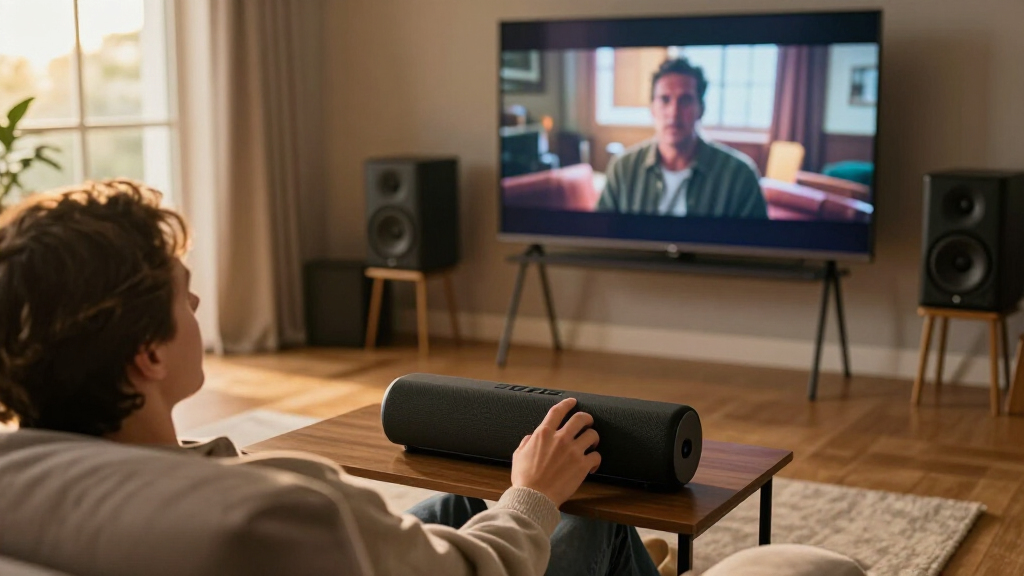

Wireless surround sound systems can bring rear-channel effects and fuller movie audio to a living room without running speaker wire across the floor, but “wireless” does not always mean every component is cable-free. My best overall pick is the ULTIMEA Skywave X40 for its 5.1.2-channel Dolby Atmos design; the JBL Bar 700MK2 is a standout for a more premium, flexible setup, while the Fire TV Soundbar Plus bundle pairs the bar with a subwoofer and surround speakers. The main tradeoffs are immersive performance versus setup complexity, room coverage versus compactness, and genuine rear speakers versus virtual surround processing. Compatibility, speaker placement, and how each system connects to the TV can matter as much as channel count. Continue reading for the full comparison and guidance on choosing a system that fits your room and listening habits.

Get your home office setup delivered free — and shop member deals
- Fast, free delivery on millions of items
- Access to Prime Big Deal Days deals on October 6–7
- Prime Video, Amazon Music and more included
Complete the kit


Key Takeaways
- Physical rear speakers and virtual surround are different experiences: Several ULTIMEA soundbars advertise 7.1-channel processing, while bundled systems with rear speakers can place effects behind the listener more directly.
- Atmos channel numbers do not tell the whole story: The Skywave X40 and ULTIMEA 5.1.2 option add height-channel processing, but room shape, ceiling reflections, and placement affect how noticeable that effect is.
- “Wireless” still involves planning: Wireless subwoofers and surrounds reduce long signal cables, but speakers may need power, and systems such as the Sony HT-S40R use a separate rear-speaker connection arrangement.
- The lineup spans very different room needs: Compact soundbar bundles suit simpler TV upgrades, while the Bobtot system’s large subwoofer and high peak-power claim point toward buyers prioritizing a more traditional, powerful home-theater setup.
- Brand-specific strengths shape the shortlist: JBL, Bose, Sony, LG, and TCL bring distinct ecosystems or setup approaches, while ULTIMEA offers many channel and speaker configurations that call for closer model-by-model comparisons.




| wireless surround sound system | Channels | Mounting |
|---|---|---|
| ULTIMEA 7.1ch Surround Sound B | 7.1 | Tabletop or wall mount |
| Fire TV Soundbar Plus with Sub | 5.1 | — |
| ULTIMEA Skywave X40 5.1.2ch So | 5.1.2 | — |
| Bobtot Wireless Surround Sound | — | — |
| ULTIMEA 7.1ch Surround Sound S | 7.1 | Tabletop or wall mount |
| ULTIMEA 7.1ch Fully Wireless S | 7.1 | Tabletop |
| ULTIMEA 5.1.2ch Sound Bar with | 5.1.2 | Tabletop or wall mount |
| JBL Bar 700MK2 Soundbar with S | 7.1 | Wall mount |
| Sony HT-S40R 5.1ch Home Theate | 5.1 | — |
| ULTIMEA 7.1ch Sound Bar with S | 7.1 | Tabletop or wall mount |
| LG S40TR 4.1 Channel Home Thea | 4.1 | Tabletop |
| Bose Surround Sound System for | — | Tabletop |
| ULTIMEA 7.1ch Surround Sound S | 7.1 | Wall mount |
| ULTIMEA 7.1ch Sound Bar with S | 7.1 | Tabletop, wall mount |
| TCL S65K S Series 5.1 Channel | 5.1 | — |
More Details on Our Top Picks
ULTIMEA 7.1ch Surround Sound Bar for TV with Subwoofer
I’d pick this ULTIMEA for buyers who want a speaker-based 7.1 setup and fine control over how it sounds. Its four surround speakers and subwoofer create a more physically distributed system than a soundbar relying mainly on virtual effects, while the app’s 10-band EQ and 121 presets give listeners room to adjust dialogue, bass, and tone for different content. Compared with the ULTIMEA Aura A60 Pro, it shares the multi-speaker, app-tuning approach but doesn’t list Dolby Atmos support, so the A60 Pro is the clearer fit for buyers prioritizing that format. The tradeoff here is practical: multiple speakers need space and setup, and the subwoofer is wired. I’d favor it over a simpler bar when placement options and tuning matter more than a streamlined installation.
Pros:- Four surround speakers and a subwoofer support a speaker-based 7.1 arrangement.
- App control includes a 10-band EQ and 121 presets for sound adjustments.
- VocalMatrix, SurroundX, and BassMX are designed to shape dialogue, surround effects, and bass.
- Wireless rear surround speakers can reduce cable runs across the room.
Cons:- The wired subwoofer and multiple speakers require planning for placement and power or signal connections.
- Dolby Atmos support is not listed, unlike the ULTIMEA Aura A60 Pro.
- The multi-speaker arrangement may be excessive for compact rooms.
Best for: TV and gaming-room owners who want multiple surround speakers and app-based EQ control.
Not ideal for: People with very small rooms or anyone wanting a single-bar setup with minimal speaker placement and wiring.
- Channels:7.1
- Surround speakers:Four
- Subwoofer:Wired
- Sound control:App control, 10-band EQ, 121 presets
- Audio features:VocalMatrix, SurroundX, BassMX
- Mounting:Tabletop or wall mount
- Bluetooth range:15 meters
- Dimensions:15.75 x 2.76 x 3.54 inches
Our verdict“Choose this ULTIMEA if you want four surround speakers and extensive app tuning, but not if Atmos support or a low-clutter setup is your priority.”
Fire TV Soundbar Plus with Subwoofer and Surround Speakers, 5.1 Channel, Dolby Atmos
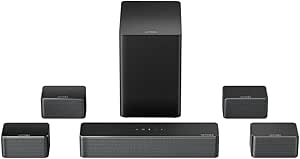
The Fire TV Soundbar Plus is the most straightforward pick here for buyers who want 5.1 surround with Dolby Atmos and DTS:X in a bundled system. It includes a wireless subwoofer and surround speakers, avoiding the need to assemble those pieces separately. Compared with the ULTIMEA Aura A60 Pro, it has fewer listed channels and no app EQ details in the supplied specs, but its supported formats and stated Fire TV compatibility make it a natural match for a streaming-focused setup. Bluetooth also gives it a way to play audio from compatible devices. The tradeoff is that “wireless” doesn’t mean a one-piece installation: the speakers and subwoofer still need placement, and the supplied connections include HDMI, optical, AC, and USB-A. I’d choose it for ecosystem fit and format support, not for extensive sound customization.
Pros:- Supports Dolby Atmos and DTS:X for compatible content.
- Includes a wireless subwoofer and surround speakers for a complete 5.1 setup.
- Bluetooth supports audio streaming from compatible devices.
- HDMI and optical connections offer multiple ways to connect a television.
Cons:- A 5.1-channel layout has fewer listed channels than the ULTIMEA 7.1 systems in this roundup.
- The separate subwoofer and surround speakers still require room placement and setup.
- The supplied details do not list app-based EQ or extensive sound customization.
Best for: Fire TV users who want a bundled 5.1 system with Dolby Atmos, DTS:X, and Bluetooth playback.
Not ideal for: Buyers seeking 7.1-channel layouts, detailed app-based EQ, or the fewest separate components in the room.
- Channels:5.1
- Supported formats:Dolby Atmos, DTS:X
- Connectivity:Wireless system
- Ports:HDMI, optical, AC, USB-A
- Bluetooth:Supported
- Soundbar dimensions:37 x 5.2 x 2.5 inches
- Subwoofer dimensions:10.4 x 10.4 x 13.4 inches
- Warranty:1-year limited
Our verdict“Pick the Fire TV Soundbar Plus for a bundled Atmos-capable 5.1 setup that suits a Fire TV-centered room, rather than for detailed tuning or maximum channel count.”
ULTIMEA Skywave X40 5.1.2ch Sound Bar for Smart TV, Surround Sound System
For a buyer focused on Dolby Atmos and a powerful home-theater presentation, the Skywave X40 is the standout in this group. Its 5.1.2-channel format adds height-channel support, while the listed 530W peak output points to a system aimed at bigger, more cinematic playback than the 5.1 Fire TV Soundbar Plus. The X40 also lists 4K HDR pass-through, which can simplify routing compatible video sources through the soundbar. Compared with the 7.1 ULTIMEA Aura A60 Pro, this model has fewer main channels but specifically lists Atmos and 4K HDR pass-through, giving it a different priority rather than simply a higher channel count. One drawback is that the supplied specs do not clarify the wireless configuration of its surround speakers, so buyers should verify placement and connection needs before choosing it.
Pros:- 5.1.2-channel layout supports height effects for compatible Atmos content.
- Dolby Atmos support is listed.
- 4K HDR pass-through can keep compatible video sources connected through the soundbar.
- 530W peak output is suited to buyers seeking a forceful home-theater presentation.
Cons:- The supplied specs do not specify whether the surround speakers connect wirelessly.
- Its 43.31-inch listed length needs more front-wall or furniture space than a compact bar.
- No app EQ details are provided, unlike the ULTIMEA Aura A60 Pro.
Best for: Home-theater owners with compatible Atmos content and 4K HDR sources who want a high-output 5.1.2 soundbar system.
Not ideal for: Buyers who need a confirmed fully wireless surround layout, a compact bar, or a tabletop-only installation with detailed app control.
- Channels:5.1.2
- Peak output:530W
- Audio format:Dolby Atmos support
- Video feature:4K HDR pass-through
- Subwoofer diameter:6.5 inches
- Control method:Remote
- Listed dimensions:43.31 x 2.76 x 3.94 inches
- Bluetooth range:15 meters
Our verdict“Choose the Skywave X40 if Atmos height effects, 4K HDR pass-through, and high peak output lead your priorities, but check the surround connection details before buying.”
Bobtot Wireless Surround Sound System 1000W Peak Power, 8″ Subwoofer
The Bobtot takes a different route from the soundbar-centered systems here: it pairs four wireless satellite speakers with an 8-inch subwoofer and a stated 1000W peak output. That makes it a better match for buyers who want room-filling bass and flexible speaker placement than for those seeking a slim, understated TV bar. Its 5.1/2.1 modes and Bluetooth, USB, and optical inputs add flexibility for different sources; microphone inputs with echo and an FM receiver also serve uses that the Fire TV Soundbar Plus doesn’t list. In exchange, the large subwoofer enclosure and LED-equipped design demand more room and make this a less discreet living-room choice. The supplied data also doesn’t list Dolby Atmos or DTS:X, so I’d favor Fire TV’s system for those formats and the Bobtot for bass-forward, multi-input use.
Pros:- Four wireless satellite speakers allow flexible surround placement.
- An 8-inch subwoofer and 1000W peak power target bass-heavy playback.
- Supports 5.1 and 2.1 listening modes.
- Bluetooth, USB, optical, FM radio, and microphone inputs support varied sources and uses.
Cons:- The 19 x 17 x 17.7-inch listed dimensions indicate a bulky system that needs substantial space.
- Dolby Atmos and DTS:X support are not listed, unlike the Fire TV Soundbar Plus.
- The supplied specs do not describe app-based EQ or room calibration.
Best for: Buyers setting up a larger media or party room who want wireless satellites, strong bass, and several input options.
Not ideal for: Small living rooms or viewers prioritizing a compact soundbar, Dolby Atmos, or a clearly specified modern format suite.
- Peak power:1000W
- Listening modes:5.1 and 2.1
- Subwoofer:8 inches
- Satellite speakers:Four wireless speakers
- Wireless speaker range:32 feet
- Inputs and features:Bluetooth, USB, optical, FM receiver, microphone inputs with echo
- Dimensions:19 x 17 x 17.7 inches
- Control method:Remote
Our verdict“Choose the Bobtot for a spacious, bass-forward setup with varied inputs, not for a discreet installation or Atmos-focused movie system.”
ULTIMEA 7.1ch Surround Sound System for TV with Dolby Atmos, Aura A60 Pro
The Aura A60 Pro brings together two priorities that are split across other picks: a 7.1-channel speaker layout and listed Dolby Atmos support. Four surround speakers, a wired 5.25-inch subwoofer, and app-based controls give buyers a system built for shaping a dedicated home-theater sound rather than simply adding a wider front stage. Its 10-band EQ and 121 presets provide more listed tuning options than the Fire TV Soundbar Plus, while the Skywave X40 offers a 5.1.2 layout and 4K HDR pass-through instead of this model’s 7.1 configuration. The compromise is placement: four surround speakers need space, and the product data notes a recommended room area of 108 to 270 square feet. The subwoofer is wired, and the supplied information is not fully consistent about rear-speaker wiring, so confirm the connection arrangement for your room.
Pros:- Combines a 7.1-channel layout with listed Dolby Atmos support.
- Four surround speakers create a distributed speaker setup.
- App control includes a 10-band EQ and 121 presets.
- The 5.25-inch wired subwoofer supports dedicated low-frequency output.
Cons:- The recommended room area of 108 to 270 square feet makes it a poor fit for some compact spaces.
- The wired subwoofer limits placement and requires a cable connection.
- Surround-speaker connection details are unclear in the supplied product information.
Best for: Home-theater owners with a medium or large room who want Atmos support, a 7.1 speaker layout, and app-based sound tuning.
Not ideal for: Apartment listeners with limited floor space or buyers who need every speaker and the subwoofer to connect wirelessly.
- Channels:7.1
- Audio format:Dolby Atmos
- Surround speakers:Four
- Subwoofer:5.25-inch, wired
- Peak power:420W
- Sound control:App control, 10-band EQ, 121 presets
- Recommended room area:108 to 270 square feet
- Mounting:Tabletop or wall mount
Our verdict“Pick the Aura A60 Pro if you want app-tunable 7.1 surround with Atmos and have room for separate speakers, but verify its wiring layout first.”
ULTIMEA 7.1ch Fully Wireless Sound Bar with Dolby Atmos, Wireless Subwoofer
The Poseidon M100 is the clearest fit here for shoppers who want a 7.1-channel layout with wireless surround speakers and subwoofer. That arrangement can cut long audio cables running between the TV and rear speakers, though the speakers still need nearby power outlets. Compared with the Sony HT-S40R, which includes rear speakers but uses a mix of wired and wireless connections, this ULTIMEA offers more flexible audio placement. HDMI eARC, optical, USB, and Bluetooth 6.0 also give it more connection choices than a basic TV-only setup. App control and BassMX add room to tailor sound, but setup may take more work than a simpler bar-and-subwoofer system. I’d choose it for a dedicated indoor movie or gaming space, not for outdoor use or a room without convenient outlets.
Pros:- 7.1-channel Dolby Atmos system includes two wireless surround speakers and a wireless subwoofer.
- HDMI eARC, optical, USB, and Bluetooth 6.0 cover common TV and audio connections.
- App control supports personalized sound settings.
- Wireless audio links reduce the need to run speaker cables across the room.
Cons:- Wireless speakers and subwoofer still require power outlets.
- Setup may be more involved than a soundbar with only a subwoofer.
- Not water resistant, so it is intended for indoor use.
Best for: Home theater and gaming buyers who want wireless rear-speaker placement, several connection options, and app-based sound adjustments.
Not ideal for: Shoppers seeking a quick, minimal setup or rear speakers that can operate without nearby power outlets.
- Channels:7.1
- Audio format:Dolby Atmos
- Included speakers:Soundbar, two wireless surround speakers, wireless subwoofer
- Subwoofer diameter:6.5 inches
- Connections:HDMI eARC, optical, USB, Bluetooth 6.0
- Controls:App, remote, touch
- Mounting:Tabletop
Our verdict“Choose the Poseidon M100 if you want a flexible 7.1-channel indoor setup and can place powered speakers around the room.”
ULTIMEA 5.1.2ch Sound Bar with Dolby Atmos, Surround Sound System for TV
This ULTIMEA takes a different route from the Poseidon M100: its 5.1.2-channel arrangement and up-firing speakers target overhead effects rather than a larger 7.1 channel count. That can suit movie watchers who value height cues and have a compatible TV connection, with HDMI eARC supporting lossless audio transmission. The 5.25-inch subwoofer adds a dedicated bass unit, while app equalizer controls let listeners tune the presentation. The tradeoff is a narrower fit for mixed-format libraries: the supplied product information says it does not support DTS. Unlike the JBL Bar 700MK2, whose detachable surrounds can be repositioned, the ULTIMEA’s main distinction is Atmos height playback. I’d favor it for a TV-focused room and skip it if DTS compatibility or a fully flexible surround layout matters more.
Pros:- 5.1.2-channel layout uses up-firing speakers for Atmos height effects.
- HDMI eARC supports lossless audio transmission.
- App control and equalizer settings allow sound customization.
- 5.25-inch subwoofer provides a dedicated source of bass.
Cons:- Does not support DTS audio, limiting compatibility with some content.
- Requires a compatible TV or source connection for its intended setup.
- Not water resistant and suited to indoor use.
Best for: TV and movie viewers with an HDMI eARC-equipped television who prioritize Dolby Atmos height effects and app-based EQ.
Not ideal for: Buyers with DTS-heavy media libraries or those who want detachable wireless rear speakers for flexible placement.
- Channels:5.1.2
- Audio format:Dolby Atmos
- Speaker layout feature:Up-firing speakers
- Subwoofer diameter:5.25 inches
- Connection:HDMI eARC
- Control:App
- Dimensions:31.5 x 1.81 x 3.54 inches
- Mounting:Tabletop or wall mount
Our verdict“Pick this ULTIMEA over the Poseidon M100 if Atmos height effects matter more to you than a 7.1-channel wireless surround layout.”
JBL Bar 700MK2 Soundbar with Subwoofer, Dolby Atmos Surround, Wireless, Black
The JBL Bar 700MK2 is the most flexible choice in this group for people who want detachable wireless surround speakers rather than fixed rear units. Its 10-inch wireless subwoofer and listed 780W output give it a larger-scale setup than the ULTIMEA 5.1.2 system, while Dolby Atmos and DTS Virtual:X cover two approaches to immersive playback. Wi-Fi, AirPlay, and Bluetooth also make it better suited to streaming beyond TV audio. The detachable speakers can be positioned for surround listening and moved when the room needs them back on the bar. That flexibility takes space, though, and the system is still designed for indoor use. I’d choose JBL for a living room that can accommodate the subwoofer and surrounds; the Sony HT-S40R is a less detachable, more conventional alternative.
Pros:- Detachable wireless surrounds allow flexible placement when watching movies.
- 10-inch wireless subwoofer is larger than the supplied ULTIMEA subwoofer options.
- Dolby Atmos and DTS Virtual:X support immersive playback.
- Wi-Fi, AirPlay, Bluetooth, HDMI, optical, and USB provide varied connections.
Cons:- Detachable surround speakers and large subwoofer need storage and floor space.
- No waterproof rating; intended for indoor home theater use.
- The supplied specifications do not identify a precise HDMI version or eARC support.
Best for: Living-room movie and music listeners who want detachable wireless surrounds, broad streaming options, and a large subwoofer.
Not ideal for: Small-room buyers who lack space for a 10-inch subwoofer and separate surround speakers, or anyone needing outdoor-rated equipment.
- Channels:7.1
- Audio formats:Dolby Atmos, DTS Virtual:X
- Maximum output power:780 watts
- Subwoofer diameter:10 inches
- Surround speakers:Detachable wireless speakers
- Wireless connections:AirPlay, Bluetooth, Wi-Fi
- Other connections:HDMI, optical, USB
- Mounting:Wall mount
Our verdict“Choose the JBL if detachable surround speakers and flexible streaming matter more than keeping the system compact.”
Sony HT-S40R 5.1ch Home Theater Soundbar System, Black
The Sony HT-S40R suits buyers who want a conventional 5.1 system with included rear speakers and do not need the wireless placement flexibility of the JBL Bar 700MK2. Its listed 600W output and customizable sound modes are aimed at filling a home theater space, while HDMI and Bluetooth cover everyday TV and audio use. Sony’s color-coded connections can make setup more approachable than the ULTIMEA 7.1-channel model, which combines wired and wireless elements and offers extensive app tuning. The tradeoff is that Sony’s connection description is mixed wired and wireless, so this is not a fully wireless speaker arrangement. Its 5.1-channel design also lacks the supplied Atmos feature set of the ULTIMEA 5.1.2. I’d shortlist it for buyers who favor a familiar rear-speaker setup over detachable or wireless surrounds.
Pros:- Includes rear speakers for physical surround placement.
- Listed 600W output supports a home-theater-oriented setup.
- HDMI and Bluetooth provide common connection options.
- Color-coded connections can help simplify wiring.
Cons:- Uses a mix of wired and wireless connections rather than a fully wireless speaker layout.
- Does not list Dolby Atmos support, unlike the ULTIMEA 5.1.2 and JBL Bar 700MK2.
- The soundbar and rear-speaker setup needs room and cable planning.
Best for: TV owners who want a traditional 5.1 soundbar package with rear speakers and straightforward, color-coded connections.
Not ideal for: Buyers seeking fully wireless rear speakers, Dolby Atmos height effects, or a compact system with minimal wiring.
- Channels:5.1
- Power output:600 watts
- Speaker arrangement:Soundbar with rear speakers
- Connectivity:Wired and wireless
- Wireless technology:Bluetooth
- Ports:HDMI, USB
- Dimensions:13.66 x 33.22 x 9.76 inches
- Warranty:1 year
Our verdict“Choose the Sony if you want included rear speakers and a conventional 5.1 setup, not a fully wireless or Atmos-focused system.”
ULTIMEA 7.1ch Sound Bar with Subwoofer Virtual Surround Sound System for TV
This ULTIMEA stands out for buyers who like shaping sound themselves: its app offers a 10-band equalizer and 121 preset EQ matrices, alongside adjustable bass, midrange, and treble. The system lists four surround speakers and a wired subwoofer, so it differs from the Poseidon M100, which uses wireless surround speakers and a wireless subwoofer. That distinction matters for room planning: this model may reduce some rear-speaker cable runs, but the subwoofer remains wired and the overall setup can take more effort. At 41 inches wide, it also needs a substantial TV stand or wall space. Its broad device compatibility suits mixed TV, gaming, and computer use, but shoppers seeking effortless wireless installation should favor the Poseidon M100 instead.
Pros:- App provides a 10-band equalizer and 121 preset EQ matrices.
- Bass, midrange, and treble can be adjusted independently.
- Four surround speakers support a more enveloping presentation than a bar alone.
- Listed compatibility includes TVs, computers, gaming consoles, projectors, and mobile devices.
Cons:- Subwoofer is wired, unlike the Poseidon M100’s wireless subwoofer.
- Setup involves both wired and wireless connections and may be complex.
- At 41 inches wide, it needs more space than a compact soundbar.
Best for: Hands-on TV, gaming, and computer users who want detailed app EQ controls and can accommodate a wide soundbar with a wired subwoofer.
Not ideal for: Buyers who want a fully wireless subwoofer, simple plug-and-play installation, or a compact soundbar for a small room.
- Channels:7.1
- Surround speakers:Four
- Subwoofer connection:Wired
- EQ controls:10-band equalizer; 121 preset matrices
- Sound technology:BassMX, SurroundX
- Controls:App, remote
- Dimensions:16 x 41 x 3 inches
- Weight:4.6 kg
- Mounting:Tabletop or wall mount
Our verdict“Pick this model if extensive EQ control is your priority and you are comfortable planning around a wired subwoofer.”
LG S40TR 4.1 Channel Home Theater Soundbar with Wireless Subwoofer and Rear Speakers, Dolby Audio, AI Sound Pro, Black
The LG S40TR is a straightforward way to add genuine rear-channel sound, a wireless subwoofer, and a soundbar without moving up to a larger 5.1 setup. Its 4.1 channels and Dolby Digital and DTS compatibility suit movie and TV playback, while app-based sound adjustments give owners some control over the presentation. Compared with the Bose Surround Sound System, this is a more complete package: Bose’s compact speakers need a compatible soundbar, while the LG includes the main bar, subwoofer, and rear speakers.
The tradeoff is that “wireless” applies to the subwoofer, not a fully cable-free room: the rear speakers still need wired connections and AC power. Some features also work best with an LG TV, so I’d favor it for an LG-centered setup rather than a mixed-brand system. Measure the space before buying, since the bar and separate speakers need room.
Pros:- Includes rear surround speakers and a wireless subwoofer in one system
- Dolby Digital and DTS support for compatible content
- Sound adjustments are available through the LG Soundbar App
- Optical input and USB port offer additional connection options
Cons:- Rear speakers still need wired connections and AC power
- Some features are limited to compatible LG TVs
- Separate components and the 28.4-inch soundbar may be awkward in a tight setup
Best for: LG TV owners who want a bundled soundbar, subwoofer, and real rear speakers for movies without assembling a system from separate components.
Not ideal for: Buyers who need cable-free rear speakers, have very limited space, or want soundbar features that work equally across TV brands.
- Channels:4.1
- Wireless subwoofer:Yes
- Rear surround speakers:Yes
- Audio formats:Dolby Audio, DTS Digital
- Soundbar dimensions:28.4 × 2.5 × 3.4 inches
- Subwoofer dimensions:6.7 × 12.6 × 9.9 inches
- Connections:Optical input, USB
- Mounting:Tabletop
Our verdict“Choose the LG S40TR if you own an LG TV and want a complete 4.1 system, but skip it if your rear-speaker wiring needs to stay minimal.”
Bose Surround Sound System for Home Theater, Black
The Bose Surround Sound System is a focused upgrade, not a complete wireless surround package: these small speakers add rear-channel sound to a compatible Bose soundbar. Their compact 3.7 × 3.2 × 3.3-inch cabinets are easier to tuck beside seating than the LG S40TR’s included rear speakers, making Bose a better fit when discreet placement matters more than getting every component in one box. The wireless soundbar connection also avoids a cable run back to the front of the room.
That convenience comes with a firm ecosystem limit. Unlike the TCL S65K, which is described as a complete system with a subwoofer and surround speakers, Bose requires a compatible soundbar and leaves bass expansion to an optional module. Its stated wireless range is 30 feet, which may constrain placement in larger rooms. I’d pick it for a tidy Bose-based setup, not for buyers starting from scratch or seeking a standalone system.
Pros:- Very compact speakers can be placed discreetly near seating
- Wireless connection to a compatible Bose soundbar reduces cable clutter
- Adds real rear-channel sound rather than relying only on front speakers
- Can be paired with optional Bose bass modules for system expansion
Cons:- Requires a compatible Bose soundbar and cannot serve as a standalone system
- No subwoofer is included
- Listed wireless range is limited to 30 feet
Best for: Owners of a compatible Bose soundbar who want compact rear speakers that are easy to place and visually unobtrusive.
Not ideal for: Shoppers building a surround system from scratch, users with non-Bose soundbars, or anyone who wants an included subwoofer and full system bundle.
- System role:Rear surround speaker upgrade
- Compatibility:Compatible Bose soundbars
- Speaker dimensions:3.7 × 3.2 × 3.3 inches
- Speaker size:4 inches
- Maximum wireless range:30 feet
- Maximum output power:120 watts
- Mounting:Tabletop
- Enclosure material:Plastic
Our verdict“Buy the Bose speakers as a compact add-on if you already own a compatible Bose soundbar; choose the LG S40TR or TCL S65K if you need a complete system.”
ULTIMEA 7.1ch Surround Sound System for TV, 4 Surround Speakers, Subwoofer
With a soundbar, four surround speakers, and a wireless subwoofer, this ULTIMEA system makes sense for buyers who want more speaker positions around the room than the LG S40TR’s 4.1 package provides. App control and adjustable sound modes offer room to tailor the sound for gaming, movies, or music, while the listed connections include HDMI ARC, Bluetooth, and USB. The four surround speakers are the main distinction here: this is a more involved layout aimed at listeners willing to place and connect several speakers.
Do not mistake the 7.1 label for support of every cinema format. Product data lists PCM 2.0 stereo encoding and says Dolby Atmos and DTS decoding are not supported, so the TCL S65K is the stronger pick for buyers prioritizing those formats. ULTIMEA also requires setup for multiple wired surround speakers, and the subwoofer needs an outlet despite its wireless audio link. It rewards a flexible layout, but asks for more setup effort.
Pros:- Four surround speakers allow more placement options around the listening area
- Wireless subwoofer avoids an audio cable run to the soundbar
- App control provides sound modes and EQ customization
- HDMI ARC, Bluetooth, and USB support a range of source devices
Cons:- Does not support Dolby Atmos or DTS decoding according to the supplied product data
- Multiple surround speakers require wired setup
- Subwoofer still needs a power outlet
Best for: Movie and gaming households that want four surround speakers, app-based sound customization, and flexible device connections.
Not ideal for: Buyers seeking Dolby Atmos or DTS decoding, a simple plug-and-play installation, or speakers that need no power and cable planning.
- Channels:7.1
- Surround speakers:4
- Subwoofer:Wireless; 6.5-inch diameter
- Audio encoding:PCM 2.0 stereo
- Control:App, remote control
- Connections:HDMI ARC, Bluetooth, USB
- Dimensions:15.75 × 3.54 × 2.76 inches
- Mounting:Wall mount
Our verdict“Choose this ULTIMEA if you value a four-speaker surround layout and app tuning over easier installation or advanced Dolby and DTS format support.”
ULTIMEA 7.1ch Sound Bar with Subwoofer and Surround Speakers for Smart TV
This ULTIMEA is the pick for listeners who want to shape the sound rather than stick with a few fixed modes. Its 10-band equalizer and 121 preset EQs offer more adjustment than the LG S40TR’s app-based sound customization, while SurroundX and AI tuning are intended to build a wider surround presentation from the system’s dedicated front and rear speakers. App and remote control, plus tabletop or wall-mount placement, make it adaptable to a TV room or gaming setup.
Those options bring setup and connection compromises. The product lists a wired subwoofer and notes that some speakers need wired connections, so it is not a fully wireless room solution despite the roundup category. The TCL S65K is a better match for buyers who value Dolby Atmos and DTS:X support; the supplied ULTIMEA data does not list either format. Pick this model for EQ flexibility, not for a cable-free setup or clearly documented cinema-format decoding.
Pros:- 10-band equalizer and 121 preset EQs provide extensive sound customization
- App and remote controls offer more than one way to adjust playback
- Tabletop and wall-mount placement options suit different room layouts
- Dedicated front and rear speakers support a surround-focused setup
Cons:- Subwoofer is wired, and some speakers also require wired connections
- Setup may be more involved than compact add-on speaker systems
- Supplied product data does not specify Dolby Atmos or DTS:X support
Best for: TV and gaming listeners who enjoy fine-tuning EQ and speaker levels through an app and can accommodate wired speaker connections.
Not ideal for: Buyers who want wireless connections for every component, a simple setup, or documented Dolby Atmos and DTS:X support.
- Channels:7.1
- Subwoofer connection:Wired
- Equalizer:10-band; 121 preset EQs
- Control:App, remote
- Surround technologies:SurroundX, BassMX
- Mounting:Tabletop, wall mount
- Maximum power output:330 watts
- Bluetooth range:15 meters
Our verdict“Pick this ULTIMEA for extensive app-based tuning if you can manage the speaker wiring; choose the Bose system for a simpler, smaller rear-channel upgrade.”
TCL S65K S Series 5.1 Channel Soundbar System with Dolby Atmos, DTS:X, Wireless Subwoofer, Wireless Surround Speakers, Bluetooth, and Auto Room Calibration
The TCL S65K stands out for pairing a 5.1-channel layout with Dolby Atmos, DTS:X, a wireless subwoofer, wireless surround speakers, and AI Sonic Auto Room Calibration. That combination makes it the most format-focused option in this five-product group: the ULTIMEA 7.1 system with four surround speakers lists neither Atmos nor DTS decoding, while the LG S40TR supports Dolby Digital and DTS but offers a 4.1 layout. Room calibration is useful when speaker placement and room acoustics make manual setup less appealing.
Its wireless component links reduce audio-cable runs, but they do not make the full installation component-free; each part still needs practical placement and power. The listed 630-watt maximum output is a headline spec, not a guarantee of better sound in every room. This TCL is the clearest fit for buyers who prioritize supported movie formats and calibration, while those wanting extensive EQ controls may prefer the ULTIMEA with its 10-band equalizer.
Pros:- Supports Dolby Atmos and DTS:X
- Includes wireless subwoofer and wireless surround speakers
- AI Sonic Auto Room Calibration is designed to adapt sound to the room
- Bluetooth, USB, Wi-Fi, and HDMI are listed among the connection options
Cons:- Multiple components still need space and power for a complete setup
- Advanced setup may take more effort than a soundbar-only system
- Warranty details are listed only as limited, without further specifics
Best for: Movie-focused buyers who want Dolby Atmos and DTS:X, wireless subwoofer and surround-speaker links, and automatic room calibration in one system.
Not ideal for: Shoppers who prefer a minimal-component setup, need detailed manual EQ features confirmed in the specifications, or want to avoid advanced setup altogether.
- Channels:5.1
- Supported formats:Dolby Atmos, DTS:X
- Subwoofer:Wireless; 6.5-inch diameter
- Surround speakers:Wireless
- Room calibration:AI Sonic Auto Room Calibration
- Maximum power output:630 watts
- Connections:Bluetooth, USB, Wi-Fi, HDMI, wireless
- Control:Remote; requires 2 AAA batteries
Our verdict“Choose the TCL S65K if Dolby Atmos, DTS:X, and automatic room calibration matter more to you than a simpler setup or extensive documented EQ controls.”
How We Picked
I compared these systems as home-theater packages, not as a list of channel counts. The ranking weighs how clearly each setup defines its surround approach, whether it includes dedicated rear speakers or relies more on virtual processing, and the practical role of its subwoofer and any height-channel features. I also considered TV connection options, setup demands, room flexibility, and whether the system’s stated configuration gives buyers a clear reason to choose it over a simpler soundbar.
The upper positions favor models with a strong balance of immersive features and a distinct use case, while picks with more specialized setups rank lower for buyers who may not need their extra components or power claims. I treat “wireless” carefully: it can describe audio transmission between components without removing power cables or every connection. Product names and advertised formats alone do not establish equal surround performance, so the ordering reflects the practical tradeoffs visible from each system’s configuration rather than assuming a higher channel figure is automatically better.
| wireless surround sound system | Mounting |
|---|---|
| ULTIMEA 7.1ch Surround Sound B | Tabletop or wall mount |
| Fire TV Soundbar Plus with Sub | — |
| ULTIMEA Skywave X40 5.1.2ch So | — |
| Bobtot Wireless Surround Sound | — |
| ULTIMEA 7.1ch Surround Sound S | Tabletop or wall mount |
| ULTIMEA 7.1ch Fully Wireless S | Tabletop |
| ULTIMEA 5.1.2ch Sound Bar with | Tabletop or wall mount |
| JBL Bar 700MK2 Soundbar with S | Wall mount |
| Sony HT-S40R 5.1ch Home Theate | — |
| ULTIMEA 7.1ch Sound Bar with S | Tabletop or wall mount |
| LG S40TR 4.1 Channel Home Thea | Tabletop |
| Bose Surround Sound System for | Tabletop |
| ULTIMEA 7.1ch Surround Sound S | Wall mount |
| ULTIMEA 7.1ch Sound Bar with S | Tabletop, wall mount |
| TCL S65K S Series 5.1 Channel | — |
Factors to Consider When Choosing Wireless Surround Sound Systems
Before choosing a model, match the system’s actual speaker layout to your room and how you watch. Channel labels, wireless connections, and Atmos branding can describe very different setups, so I’d check the placement and connection details before comparing feature lists.
Separate Wireless Audio From Wireless Power
Wireless usually refers to how audio reaches a subwoofer or rear speaker; it does not promise that each component operates without a power cable. A rear speaker may still need an outlet, and some packages use a hub or a cable between rear speakers even when the connection to the soundbar is wireless. Before buying, map outlet locations along the likely speaker positions and check whether the package needs a separate receiver or control box. A common mistake is to treat “wireless surround” as permission to put speakers anywhere, then discover that the room has no convenient power nearby. If outlets are scarce, a simpler bar-and-sub setup may fit better than a system with dedicated rears. If rear effects matter more, plan the power and cable route before you choose.
Choose Real Rear Speakers or Virtual Surround Deliberately
A soundbar can simulate sound from the sides or behind you through processing and room reflections, while dedicated rear speakers can reproduce surround channels from positions behind the seating area. Neither approach suits every room: physical speakers need space, power, and sensible placement, while virtual effects can depend more heavily on room shape and the listener’s position. Check whether the listed channel count describes discrete speakers, processing, or a mix of both. Do not select a system solely because its channel number is higher; a well-placed 5.1 package may deliver a clearer surround impression than a bar whose extra channels are virtual. For open-plan rooms or seating against a wall, prioritize a layout that can work with your actual placement limits. For an uncluttered setup, virtual surround can be a reasonable tradeoff.
Treat Dolby Atmos and Height Channels as Room-Dependent
Atmos labeling and a 5.1.2 configuration signal support for height effects, but they do not guarantee a convincing overhead impression in every home. Up-firing drivers generally rely on sound reflecting off the ceiling, so ceiling height, angle, texture, and the distance between the soundbar and seating can affect the result. If the room has a very high, vaulted, or heavily absorbing ceiling, do not pay extra for height processing on the assumption that it will behave like ceiling-mounted speakers. Check which audio formats your TV and streaming devices pass through, since a connection or format mismatch can limit what the system receives. Buyers who mostly watch dialogue-led programs may get more practical benefit from clear speech and easy volume control than from additional height channels. Think of Atmos as a capability, not a guarantee of a particular room effect.
Check TV Connections and Control Before Comparing Sound Features
Confirm how the system connects to the TV, including HDMI eARC or ARC, optical audio, and any format or passthrough limits listed for your devices. HDMI eARC can simplify control and carry higher-bandwidth audio formats, but the TV, soundbar, and source device must support the features you plan to use. If you rely on a game console, streaming box, or disc player, decide whether it will connect to the TV or directly to the sound system. Also check whether the TV remote can control volume and power, and whether setup depends on a phone app or account. Buyers often focus on the speaker package and miss a connection mismatch that adds extra remotes or prevents a desired audio format. A slightly simpler system with a clean connection path may be easier to live with day to day.
Match Subwoofer Output and Speaker Scale to the Room
A subwoofer can add weight to film effects and music, but a larger or more powerful unit is not automatically a better fit for a small apartment or shared wall. Room size, placement, flooring, and neighbors all affect how much bass feels usable at your preferred listening level. A compact system may be easier to position and tune, while a larger package can make more sense in a spacious room where a small bar sounds undersized. Look for practical controls such as bass adjustment or sound modes, then consider whether you can place the subwoofer away from a corner if the low end becomes boomy. Peak wattage figures are not a direct measure of clean, room-filling performance across products. Choose for controlled sound at the volume you actually use, not the biggest number in a listing.
Budget for Setup, Placement, and Future Use
The real cost of a surround system includes more than the main units: add suitable stands or shelves, cable management, and any adapters your TV requires. Dedicated rear speakers can improve placement of effects, but they also bring more setup decisions and household clutter. A soundbar-only package can be easier to install, yet may leave you wanting physical rear channels later if you watch many films or play games with directional audio. Check whether the system supports the sources and formats you expect to keep using, rather than buying around one feature you rarely access. If you move often, favor a package that is straightforward to reconnect and reposition. Paying more makes sense when it buys a feature you can use in your room, not simply a longer spec list.
Frequently Asked Questions
Does a wireless surround system need power cables at the rear speakers?
Often, yes. “Wireless” commonly means the audio signal travels to rear speakers without a long cable from the soundbar, while each speaker or a rear receiver still needs power. Some systems also connect rear speakers to each other or to a shared module. Check the included connection diagram and power requirements before ordering, then identify outlets near the intended speaker positions. If there is no practical power access behind the seating area, a virtual-surround bar may be easier to install.
Should I choose a 7.1 system or a 5.1.2 Dolby Atmos system?
The channel labels describe different priorities, not a simple quality ladder. A 5.1.2 system adds height-channel capability, while a 7.1 system may emphasize additional surround processing or speaker channels depending on its design. Check whether the system has dedicated rear and height speakers or simulates some channels through the soundbar. Your room matters too: height effects are harder to realize when the ceiling is unsuitable, and extra surround channels help less if speakers cannot be placed sensibly. Choose the layout that matches the audio formats you watch and the positions your room allows.
Can I use these systems with any TV?
Most soundbars can connect to many TVs, but the available connection affects setup and audio format support. Check whether your TV has HDMI ARC or eARC, or whether the soundbar also supports optical input if that is what your TV offers. A connection may carry basic audio while limiting advanced formats or convenient remote control. Confirm that your streaming device and TV can pass the formats you want, rather than relying on a soundbar’s format list alone. If you use several sources, plan which device connects to which input before choosing.
Are rear speakers worth the extra setup in a small living room?
They can be worthwhile when you watch films or play games where sounds moving behind you add useful direction, but the benefit depends on placement. If the sofa is against a wall, rear speakers may need to sit beside the seating rather than behind it, changing the effect. You also need to account for power access, stands or shelves, and household traffic around the speakers. In a compact or shared space, a capable soundbar with virtual processing may be the tidier compromise. Choose physical rears when you can position them safely and are likely to value the added separation.
When does paying more for Atmos or a premium brand make sense?
Paying more makes sense when the added capability fits your room and listening habits. Atmos support is more useful if your TV and sources pass compatible audio and the room can support height effects; a premium bundle may also offer a speaker layout or setup approach that suits a more involved home theater. If you mostly watch regular TV at moderate volume, advanced formats may not change your daily experience as much as clear dialogue or easy operation. Compare the included speakers, connection options, and setup requirements rather than treating brand or format labels as a shortcut. Buy the upgrade you can actually use, not one that only expands the specification list.
Conclusion
For the broadest mix of immersive features and a clearly stated layout, I’d start with the ULTIMEA Skywave X40 as best overall. The best value depends on which extras you need: the Fire TV bundle is a practical route to a bar, subwoofer, and rear speakers, while an ULTIMEA virtual-surround model may suit buyers who want fewer components. For a best premium direction, compare the JBL Bar 700MK2 with Bose’s surround option around your preferred ecosystem and room setup. The best choice for beginners is a straightforward soundbar bundle that matches the TV’s connections and avoids extra placement complexity; the Fire TV package is a reasonable starting point if you want included surrounds. For specific needs, consider the Bobtot when a large subwoofer and traditional home-theater scale are the priority, the Sony HT-S40R when its rear-speaker arrangement fits your room, and the TCL S65K when its listed Atmos, DTS:X, and calibration features align with your setup. Match the package to your room, TV connections, and tolerance for speaker placement, then use channel counts as a clue—not the final decision.
Fall Picks
fall essentials
As an affiliate, we earn on qualifying purchases.