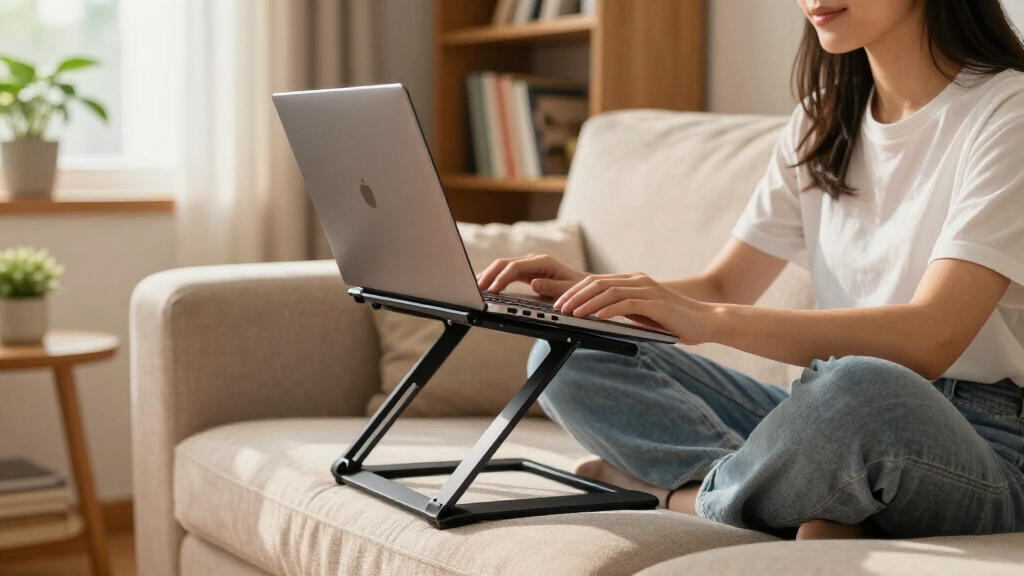

Students need an adjustable laptop stand that raises the screen to eye level, folds down small enough for a backpack, and survives daily desk-to-dorm life without wobbling. My top pick, the Nulaxy Ergonomic Adjustable Laptop Stand, earns the best overall spot for its dual-hinge height range, heavy-duty stability, and heat ventilation at a student-friendly price. If you work from bed or the couch, the Saiji Height & Angle Adjustable Lap Desk is the only option here that solves that problem, while the Lamicall Aluminum Laptop Stand is the pick for anyone who wants a premium, set-it-and-forget-it desk setup. The main tradeoff in this category is portability versus rigidity — the most travel-friendly stands sacrifice height range, and the tallest stands don’t fold flat. Read on for the full breakdown of all 14 stands.

Get business pricing on your home office setup
- Business-only prices and quantity discounts
- Tax-exempt purchasing
- Multiple users, one account, clear invoices
Complete the kit


Key Takeaways
- Dual-hinge folding stands (Nulaxy, amazon.com/dp/B0DBLBJ2HG?tag=funigy-20&ascsubtag=dc-702480″ target=”_blank” rel=”nofollow sponsored noopener”>LOXP, BESIGN) offer the best height range per dollar — single-pivot risers like the Lamicall and Amazon Basics are more stable but lock you into one fixed elevation.
- A 360° rotating base (LOXP, OMOTON LA10, BESIGN LSX7) is genuinely useful for students who share screens during group study, but it added noticeable wobble in two of the three models that include it.
- The Saiji lap desk is the only stand in this lineup that works in bed; every other option requires a flat desk surface, so students without a dedicated desk shouldn’t buy a traditional riser.
- Budget metal risers in the $15–25 range (#1, #3, #5, #12) all use nearly identical designs — paying more gets you better hinge tension, rubber quality, and foldability, not fundamentally different performance.
- Heat ventilation matters more for students running long study sessions on thin laptops; open-frame stands consistently outperform solid or minimally perforated designs.
| Laptop Stand for Desk, Adjustable Laptop Riser Holder |  | Best Overall | Support Weight: 17.6 lbs (8 kg) | Material: Sturdy metal | Compatibility: Laptops 10-15.6 inches | VIEW LATEST PRICE | See Our Full Breakdown |
| LOXP Adjustable Laptop Stand with 360° Rotating Base |  | Best for Group Study | Material: Fiber metal | Rotation: 360° | Supported Laptop Size: Up to 16 inches | VIEW LATEST PRICE | See Our Full Breakdown |
| Adjustable Laptop Stand, Portable Laptop Riser for Desk |  | Best for Backpack Carriers | Height Adjustment: 4.34 to 6.59 inches | Weight: 0.49 pounds | Folded Size: 9.96 x 1.98 x 0.68 inches | VIEW LATEST PRICE | See Our Full Breakdown |
| LOXP Adjustable Laptop Stand for Desk, Portable Airflow Laptop Riser Holder |  | Best Value | Form Factor: Tower riser | Material: Sturdy metal | Support Weight: Up to 15.4 lbs | VIEW LATEST PRICE | See Our Full Breakdown |
| Adjustable Laptop Stand for Desk, Metal Laptop Riser Holder |  | Best Budget Back-to-Basics | Material: Metal | Support Weight: 17.6 lbs (8 kg) | Compatibility: Laptops 10-15.6 inches, tablets | VIEW LATEST PRICE | See Our Full Breakdown |
| Laptop Stand for Desk Adjustable Computer Stand with 360° Rotating Base |  | Best for Group Study Sessions | Rotation: 360° | Height Adjustment: up to 11.81 inches | Compatibility: 10-16 inch laptops | VIEW LATEST PRICE | See Our Full Breakdown |
| Amazon Basics Sturdy and Portable Ergonomic Laptop Stand for Desk |  | Best Budget Pick | Height Adjustment: up to 7 inches | Supported Devices: 10 to 15.6 inch laptops and tablets | Material: Lightweight rust-resistant aluminum | VIEW LATEST PRICE | See Our Full Breakdown |
| OMOTON LA10 360° Rotating Laptop Stand Riser |  | Best for Large Laptops | Material: Aluminum | Color: Silver | Dimensions: 11.42 x 1.81 x 2.36 inches | VIEW LATEST PRICE | See Our Full Breakdown |
| BESIGN LSX7 Laptop Stand with 360° Rotating Base |  | Best Sturdiness for the Price | Compatibility: 10-15.6 inch laptops | Material: Aluminum, Metal | Weight Capacity: 13 lbs (6 kg) | VIEW LATEST PRICE | See Our Full Breakdown |
| Saiji Height & Angle Adjustable Lap Desk Laptop Stand for Bed |  | Best for Bed and Couch Studying | Surface Size: 20.5 x 11.8 inches | Adjustable Heights: 9.4 to 12.6 inches | Adjustable Angles: 0-36° | VIEW LATEST PRICE | See Our Full Breakdown |
| Nulaxy Ergonomic Adjustable Laptop Stand for Desk |  | Best for Stability on a Budget | Weight Support: 22 lbs (10 kg) | Compatibility: 10-16 inch laptops | Foldable: Yes | VIEW LATEST PRICE | See Our Full Breakdown |
| Tonmom Laptop Stand for Desk, Adjustable Laptop Riser |  | Best Ultralight Budget Pick | Height Adjustment: 2.78 to 6.5 inches | Weight: 259 g | Dimensions: 10.5 x 1.96 x 0.92 inches | VIEW LATEST PRICE | See Our Full Breakdown |
| Nulaxy Fully Adjustable Laptop Stand for Desk (C1) |  | Best for Heavy Laptops and Tall Students | Max Load Capacity: 44 lbs | Adjustable Height Range: 3.15 to 10.6 inches | Compatible Devices: Laptops up to 44 lbs, including MacBook, Lenovo ThinkPad, Dell XPS, Inspiron | VIEW LATEST PRICE | See Our Full Breakdown |
| Lamicall Aluminum Laptop Stand for 10-17.3” Laptops |  | Best Build Quality and Widest Compatibility | Compatibility: Laptops from 10 to 17.3 inches, including MacBook, Surface, Dell XPS, HP, ASUS, Acer, Chromebook, Alienware | Material: Aluminum alloy | Dimensions: 12 x 10 x 2 inches | VIEW LATEST PRICE | See Our Full Breakdown |
| adjustable laptop stands for student | Material | Compatibility | Weight |
|---|---|---|---|
| Laptop Stand for Desk | Sturdy metal | Laptops 10-15.6 inches | — |
| LOXP Adjustable Laptop Stand w | Fiber metal | Laptops 10-16 inches | — |
| Adjustable Laptop Stand | — | Laptops 10-15.6 inches | 0.49 pounds |
| LOXP Adjustable Laptop Stand f | Sturdy metal | Laptops up to 15.6 inches | 0.88 kg |
| Adjustable Laptop Stand for De | Metal | Laptops 10-15.6 inches, tablets | 780 g |
| Laptop Stand for Desk Adjustab | Not specified | 10-16 inch laptops | — |
| Amazon Basics Sturdy and Porta | Lightweight rust-resistant aluminum | — | 1.7 lbs (0.77 kg) |
| OMOTON LA10 360° Rotating Lapt | Aluminum | — | 750 g (1.65 lbs) |
| BESIGN LSX7 Laptop Stand with | Aluminum, Metal | 10-15.6 inch laptops | — |
| Saiji Height & Angle Adjustabl | Wood surface, metal legs | — | — |
| Nulaxy Ergonomic Adjustable La | — | 10-16 inch laptops | — |
| Tonmom Laptop Stand for Desk | ABS + Silicone | Laptops 10-15.6 inches | 259 g |
| Nulaxy Fully Adjustable Laptop | Not specified | — | — |
| Lamicall Aluminum Laptop Stand | Aluminum alloy | Laptops from 10 to 17.3 inches, including MacBook, Surface, Dell XPS, HP, ASUS, Acer, Chromebook, Alienware | 0.06 kg |
More Details on Our Top Picks
Laptop Stand for Desk, Adjustable Laptop Riser Holder
Best Overall is a title this stand earns through balance rather than flash. It offers full height and angle adjustment while holding up to 17.6 lbs — enough capacity that a student with a chunky 15-inch gaming laptop doesn’t have to worry. Compared with the B091M7XJ2K riser, which caps out at 6.59 inches of elevation and feels more like a travel accessory, this model behaves like a permanent desk fixture that happens to fold. The ventilation holes do real work for long study sessions where thermal throttling kills performance. The tradeoff is honest: no rotating base like the LOXP B0DBLBJ2HG, so screen-sharing with a roommate means physically moving the stand. And the anti-slip rubber mats, while grippy now, are the first part likely to degrade.
Pros:- High 17.6 lbs weight capacity handles heavier laptops
- Adjustable height and angle for genuine ergonomic relief
- Ventilation holes keep laptops cool during long sessions
- Folds flat for trips between dorm and home
Cons:- No rotating base, so repositioning to show someone your screen is awkward
- Rubber anti-slip mats will wear down with heavy use
- Size cap of 15.6 inches excludes larger machines
Best for: Students who want one sturdy do-everything stand for a dedicated desk setup that also travels home on breaks
Not ideal for: Students with laptops over 15.6 inches or those who frequently swivel their screen to share with others
- Support Weight:17.6 lbs (8 kg)
- Material:Sturdy metal
- Compatibility:Laptops 10-15.6 inches
- Foldable:Yes
- Ventilation:Multiple ventilation holes
- Adjustment:Height and angle
Our verdict“If a student is buying exactly one stand and wants it to survive four years of desk duty, this is the safest pick in the lineup.”
LOXP Adjustable Laptop Stand with 360° Rotating Base
The 360° rotating base is the whole story here, and it’s a feature almost nothing else in this roundup’s budget tier offers. During group projects, spinning a laptop toward a study partner beats lifting and repositioning a static riser like the Amazon Basics stand, which requires two hands and a clear spot on the desk. The fiber metal build supports machines up to 16 inches — a half-inch more headroom than the B0B29BZGF2 — which matters for students with slightly larger machines. The compromise is stability: on an uneven library table or a wobbly café surface, the rotating mechanism introduces wobble that fixed stands like the B0C7BKZ883 simply don’t have. It’s a trade of steadiness for flexibility, and buyers should know which one they value more.
Pros:- 360° rotation makes screen-sharing effortless
- Supports laptops up to 16 inches, larger than most budget picks
- Folds down for backpack transport
- Fiber metal construction is durable for daily packing
Cons:- Rotating base is less stable on uneven surfaces than fixed risers
- Still capped at 16 inches, excluding 17-inch laptops
Best for: Students who regularly collaborate — group projects, study partners, showing a screen during tutoring sessions
Not ideal for: Students working on uneven or cramped surfaces where the rotating base adds wobble and footprint
- Material:Fiber metal
- Rotation:360°
- Supported Laptop Size:Up to 16 inches
- Compatibility:Laptops 10-16 inches
- Foldable:Yes
- Portability:Foldable and portable
Our verdict“The right choice when collaboration matters more than rock-solid stability at a single desk.”
Adjustable Laptop Stand, Portable Laptop Riser for Desk
At 0.49 pounds and folding down to roughly the size of a folded umbrella, this is the stand for students whose office is wherever the nearest outlet is. Compared with the LOXP B0FB96TYFV at nearly two pounds, carrying this daily feels negligible — it’s the difference between noticing a stand in your bag and forgetting it’s there. The open-frame design does double duty for airflow, which matters when a laptop is working hard on a library desk for hours. The honest limitation: height range tops out at 6.59 inches, so a taller student sitting at a fixed desk will want more elevation, and the B0B29BZGF2 delivers a more complete ergonomic position. Also, both support bars must be set to the same level or the laptop sits tilted — a small fuss factor unique to this design.
Pros:- Featherweight at 0.49 pounds — lightest in this batch
- Very compact folded footprint slips into any bag
- Open design dissipates heat effectively
- Anti-slip pads and smooth edges protect the laptop
Cons:- Limited height range of 4.34 to 6.59 inches
- Support bars must be set evenly or the laptop tilts
- Not suited to laptops over 15.6 inches
Best for: Students who commute daily and need a stand that lives in a backpack without adding noticeable weight
Not ideal for: Taller students at fixed desks who need more than 6.6 inches of elevation for proper eye-level positioning
- Height Adjustment:4.34 to 6.59 inches
- Weight:0.49 pounds
- Folded Size:9.96 x 1.98 x 0.68 inches
- Compatibility:Laptops 10-15.6 inches
- Cooling:Open-frame airflow design
- Stability:Anti-slip pads
Our verdict“The pick for students who carry their entire setup across campus every single day.”
LOXP Adjustable Laptop Stand for Desk, Portable Airflow Laptop Riser Holder
This stand represents the value sweet spot: full height and angle adjustment, a tower-style riser with heat venting, and a 15.4 lbs capacity — all at a price that undercuts premium options like the Lamicall aluminum stand while covering 90% of the same use cases. It hits harder than the ultraportable B091M7XJ2K for desk-bound students: at 0.88 kg it’s noticeably heavier, but that extra mass translates into a steadier platform for typing out a ten-page paper. The tower form factor also lifts heat away from the desk surface more effectively than flat risers. What you give up is choice and capacity — it comes in black only, tops out at 15.6 inches, and lacks the rotating base of the LOXP B0DBLBJ2HG, its own sibling model. For a budget buyer, those are reasonable omissions.
Pros:- Strong feature set for the price point
- Supports up to 15.4 lbs with stable tower design
- Effective heat venting for long study sessions
- Folds for occasional transport
Cons:- Heavier than true travel stands at 0.88 kg
- Black-only colorway limits choice
- Capped at 15.6-inch laptops
Best for: Budget-conscious students who want a stable, full-featured desk stand without paying premium prices
Not ideal for: Students with 16-inch or larger laptops, or anyone wanting color options beyond black
- Form Factor:Tower riser
- Material:Sturdy metal
- Support Weight:Up to 15.4 lbs
- Compatibility:Laptops up to 15.6 inches
- Special Features:Adjustable, ergonomic, foldable, heat-vent, portable
- Weight:0.88 kg
- Color:Classic Black
Our verdict“The most sensible spend for a student who needs adjustability and stability but has a tight budget.”
Adjustable Laptop Stand for Desk, Metal Laptop Riser Holder
Think of this as the no-frills workhorse — metal construction, 17.6 lbs capacity, ventilation holes, and foldability, with nothing you don’t pay for. Compared with the LOXP B0FB96TYFV, it matches the weight capacity and adds tablet compatibility, making it a better fit for students juggling an iPad and a laptop on one desk. It also undercuts the B0B29BZGF2 by trimming extras rather than core function: you still get full height and angle adjustment, just with a plainer design that won’t win any aesthetics contest next to a Lamicall. The 780 g weight sits in the middle of this batch — fine for desk-to-desk moves, less ideal for daily backpack duty where the B091M7XJ2K wins. Its anti-slip pads and fold-flat hinge are the practical details that make it dependable despite the basic look.
Pros:- Full 17.6 lbs support matches pricier stands
- Works with tablets as well as laptops
- Ventilation holes plus anti-slip pads for safe daily use
- Folds flat for storage between semesters
Cons:- Utilitarian design offers no visual appeal
- 780 g weight is awkward for constant travel
- Same 15.6-inch laptop size ceiling as every budget pick here
Best for: Price-sensitive students who need dependable height adjustment for both a laptop and a tablet
Not ideal for: Students who care about desk aesthetics or need a stand light enough for daily commuting
- Material:Metal
- Support Weight:17.6 lbs (8 kg)
- Compatibility:Laptops 10-15.6 inches, tablets
- Weight:780 g
- Foldable:Yes
- Cooling:Ventilation holes
- Grip:Anti-slip pads
Our verdict“A practical, inexpensive riser for students who prioritize function over form and never need to move it far.”
Laptop Stand for Desk Adjustable Computer Stand with 360° Rotating Base
What separates this stand from most budget risers is its 360° rotating base, which turns a solo desk accessory into a shared study tool. When a classmate needs to see your screen during a group project, you spin the laptop instead of passing it around — a small thing that matters a lot in dorm rooms and library corners. The height range reaching 11.81 inches is taller than what the Amazon Basics stand offers (7 inches), making it better for tall students who need the screen closer to eye level. It folds down for backpack transport, similar to the OMOTON LA10. The tradeoff is uncertainty: material and weight capacity are unspecified, so buyers trusting a heavy gaming laptop to it are taking a gamble compared to the BESIGN LSX7’s clearly stated 13 lb rating.
Pros:- 360° rotation makes screen sharing effortless
- Tall 11.81-inch maximum height suits eye-level viewing
- Folds flat for backpack storage
- Open design promotes laptop cooling
Cons:- No stated weight capacity or material details
- Limited color options and vague specs make comparison shopping harder
Best for: Students who regularly collaborate or share screens during group study and want quick rotation
Not ideal for: Buyers with heavy 16-inch gaming laptops — the unlisted weight capacity makes stability a question mark
- Rotation:360°
- Height Adjustment:up to 11.81 inches
- Compatibility:10-16 inch laptops
- Foldable:Yes
- Material:Not specified
- Weight Capacity:Not specified
Our verdict“Pick this if screen-sharing during group work is a regular part of your study routine — skip it if you need verified load ratings.”
Amazon Basics Sturdy and Portable Ergonomic Laptop Stand for Desk
This is the safe, no-surprises option in the lineup, and that’s exactly its appeal for a student on a tight budget. Unlike the generic B0GH5KSCKG stand with unspecified materials, here you get a lightweight rust-resistant aluminum build and a published 11 lb load capacity, so you know before buying whether your laptop fits. It folds to a slim 1.8-inch profile that slides into a backpack sleeve easily. The honest limitation is ergonomics: with a maximum height of just 7 inches, it falls short of the OMOTON LA10’s 10.4-inch range, so taller students hunched over low desks won’t get full neck relief. It also caps out at 15.6-inch laptops, ruling out the largest machines. Compared to pricier rotating models, you give up the 360° base but keep the core benefits: cooling, foldability, and durability.
Pros:- Published 11 lb load capacity removes guesswork
- Rust-resistant aluminum survives backpack wear
- Folds to 1.8 inches thick for travel
- Ventilated design keeps laptops cool
Cons:- Shorter 7-inch height range limits ergonomic benefit
- Needs a flat, solid surface to stay stable
Best for: Budget-conscious students who want a known brand with clear specs at the lowest possible price
Not ideal for: Tall students or anyone with a 17-inch laptop — the 7-inch max height and size cap will frustrate both
- Height Adjustment:up to 7 inches
- Supported Devices:10 to 15.6 inch laptops and tablets
- Material:Lightweight rust-resistant aluminum
- Load Capacity:11 lbs (5 kg)
- Folded Dimensions:10 x 8.7 x 1.8 inches
- Weight:1.7 lbs (0.77 kg)
- Color:Silver
Our verdict“The dependable starter stand — buy it if price and predictability matter more than maximum adjustability.”
OMOTON LA10 360° Rotating Laptop Stand Riser
The OMOTON LA10 earns its spot by solving a problem most stands here ignore: supporting laptops up to 17 inches. Where the Amazon Basics stand stops at 15.6 inches and the BESIGN LSX7 matches that cap, this model welcomes the bigger 16- and 17-inch machines that engineering and design students often carry. Its 1.8- to 10.4-inch height range spans lower than most competitors too, which matters if you type directly on the laptop and want only a slight tilt rather than a full riser position. At 1.65 lbs and folding to roughly 1.8 inches thick, it’s genuinely portable. The compromises are real but manageable: friction-based joints may loosen after months of daily adjustments, and very thick gaming laptops can sit awkwardly on the arms. Anti-slip silicone pads do their job quietly and well.
Pros:- Fits laptops up to 17 inches — the widest range here
- Height adjusts from 1.8 to 10.4 inches without tools
- Anti-slip silicone pads keep the laptop planted
- Lightweight 1.65 lb aluminum body travels well
Cons:- Friction joints could wear and slip over time
- Very large or thick laptops may not sit securely
Best for: Students with 16- or 17-inch laptops who found other stands’ size limits disqualifying
Not ideal for: Owners of thick, heavy gaming laptops — the arms and friction joints aren’t built for that bulk
- Material:Aluminum
- Color:Silver
- Dimensions:11.42 x 1.81 x 2.36 inches
- Weight:750 g (1.65 lbs)
- Maximum Device Size:17 inches
- Adjustable Height Range:1.8 to 10.4 inches
- Rotation:360°
Our verdict“The obvious choice if your laptop is too big for every other stand in this guide.”
BESIGN LSX7 Laptop Stand with 360° Rotating Base
Where the Amazon Basics stand trades adjustability for price, the BESIGN LSX7 spends a little more on muscle: a 13 lb weight capacity on an aluminum-and-metal frame that out-holds both the Basics model (11 lbs) and the spec-less B0GH5KSCKG. That headroom means a laptop plus the wobble of hurried typing stays stable, which matters for students typing essays at 2 a.m. It matches the feature checklist of pricier options — height and angle adjustment plus 360° rotation — while the open frame keeps air moving under the chassis. Two honest knocks: the height mechanism is less precise than the detent-based systems on some rivals, so hitting an exact level takes fiddling, and at 1.29 kg it’s noticeably heavier to carry than the 1.65-lb OMOTON LA10, landing it more in the ‘desk-dweller’ category than daily-commuter territory.
Pros:- 13 lb capacity exceeds most stands in this price class
- Combined height, angle, and 360° rotation adjustability
- Open ventilated frame prevents overheating
- Durable aluminum and metal construction
Cons:- Height adjustment is less precise than detent-based rivals
- Heavier than comparable portable stands
Best for: Students who want maximum stability and a high weight rating without paying premium prices
Not ideal for: Commuters carrying a stand daily — at 1.29 kg it’s one of the heavier foldables here
- Compatibility:10-15.6 inch laptops
- Material:Aluminum, Metal
- Weight Capacity:13 lbs (6 kg)
- Adjustability:Height and angle adjustable, 360° rotatable
- Color:Black
- Item Weight:1.29 kg
Our verdict“The sturdy workhorse for a desk that rarely moves — skip it if your stand lives in a backpack.”
Saiji Height & Angle Adjustable Lap Desk Laptop Stand for Bed
The Saiji plays a completely different position from every other stand here. While the OMOTON LA10 and BESIGN LSX7 are desk risers that lift a laptop toward eye level, this is a self-contained lap desk with its own legs — designed for students who write papers in bed or take notes from the couch. The 80-pound weight capacity on its metal legs is almost comically overkill for a laptop, meaning you can lean on it, stack textbooks beside it, and never worry about collapse. Height adjusts from 9.4 to 12.6 inches and the surface tilts up to 36°, with a wrist rest and retractable blocker keeping the laptop from sliding when inclined. The catch: the 20.5 x 11.8-inch surface is tight — a laptop plus an external mouse crowds it fast, and it’s far bulkier to tote across campus than any folding riser here.
Pros:- Works anywhere — no desk required
- 80 lb capacity handles books and leaning elbows
- Tilting surface with wrist rest and laptop blocker
- Folds to 1.8 inches thick for under-bed storage
Cons:- Small surface area crowds a laptop plus mouse or notes
- Too bulky for daily campus commuting
Best for: Students who study in bed or on the couch and need a stand that works without a desk
Not ideal for: Library or classroom users — it’s a lap desk, not a portable riser, and takes up serious backpack space
- Surface Size:20.5 x 11.8 inches
- Adjustable Heights:9.4 to 12.6 inches
- Adjustable Angles:0-36°
- Material:Wood surface, metal legs
- Weight Capacity:80 pounds
- Folded Thickness:1.8 inches
- Included Components:Soft wrist rest pad, retractable blocker
Our verdict“Buy it for dorm-room comfort studying — not as your everyday portable riser.”
Nulaxy Ergonomic Adjustable Laptop Stand for Desk
Nulaxy’s dual-rod design is the standout here, and it’s what separates this model from the simpler Tonmom stand later in this list. Where single-hinge stands can wobble when you type aggressively during a late-night essay sprint, the two support rods keep a 16-inch laptop planted. The geometric heat-vent panel also does genuine work — a gaming laptop or an older machine running lecture recordings will stay noticeably cooler than on a flat desk. The tradeoff is honesty about materials: Nulaxy doesn’t publish what this is made of, which makes durability a bit of a gamble compared with the Lamicall aluminum stand, whose build is fully documented. At 22 lbs of load capacity, though, it handles any student laptop without complaint, and it folds flat enough to slide into a backpack sleeve between classes.
Pros:- Dual-rod support eliminates wobble during typing
- Effective heat-vent panel keeps laptops cool under load
- Folds flat for backpack transport between classes
- Supports laptops up to 22 lbs across the 10-16 inch range
Cons:- Materials are unspecified, making long-term durability hard to judge
- No tilt fine-tuning beyond the preset positions
- 22 lb load ceiling rules out unusual setups with heavy accessories
Best for: Students with heavier 15-16 inch laptops who type a lot and need a wobble-free desk setup under $30
Not ideal for: Anyone who wants verified build materials or premium aesthetics — the unspecified construction feels utilitarian next to aluminum rivals
- Weight Support:22 lbs (10 kg)
- Compatibility:10-16 inch laptops
- Foldable:Yes
- Heat Vent Design:Geometric heat-vent panel
- Stability Mechanism:Dual-rod support
- Ergonomic Focus:Elevates screen to eye level for posture correction
Our verdict“A dependable, stable workhorse for students who prioritize a rock-solid typing surface and cooling over premium materials.”
Tonmom Laptop Stand for Desk, Adjustable Laptop Riser
At 259 grams, this is the lightest stand in the entire roundup, and that single fact defines who it’s for. A student who moves between library, café, and dorm three times a day will feel the difference compared with the chunkier Nulaxy dual-rod stand, which trades portability for rigidity. The 2.78 to 6.5 inch height range is narrower than the Nulaxy C1’s 10.6-inch maximum, so very tall users hunched over a low desk won’t get full eye-level positioning. Anti-slip silicone pads do keep a laptop anchored, and ventilation is adequate for everyday browsing and note-taking rather than sustained gaming loads. This is a no-frills ABS build — it works, it disappears into a bag, and it costs little, but nobody should expect premium features at this weight and price.
Pros:- Featherlight 259 g build slips into any bag
- Genuine height adjustability despite the low price
- Anti-slip silicone pads keep laptops anchored
- Folds down to under an inch thick
Cons:- Height tops out at 6.5 inches, short of true eye-level for many desks
- 10-15.6 inch compatibility excludes larger machines
- ABS plastic feels less durable than aluminum rivals like the Lamicall
Best for: Commuter students and café hoppers who want the lightest possible stand that still raises the screen a few inches
Not ideal for: Tall students or anyone with a 16+ inch gaming laptop — the height range and size limit both fall short
- Height Adjustment:2.78 to 6.5 inches
- Weight:259 g
- Dimensions:10.5 x 1.96 x 0.92 inches
- Material:ABS + Silicone
- Compatibility:Laptops 10-15.6 inches
- Design:Foldable with anti-slip pads and ventilation
Our verdict“The pick for students who count grams in their backpack and need basic elevation, not a full ergonomic overhaul.”
Nulaxy Fully Adjustable Laptop Stand for Desk (C1)
The C1’s 3.15 to 10.6 inch adjustment range is the tallest in this batch, and paired with a 44 lb load rating, it’s built for setups the others can’t handle. A student using a 16-inch workstation laptop or even a small external keyboard balanced alongside will find this sturdier than both the original Nulaxy dual-rod stand (22 lbs) and the Tonmom riser (which caps out at 6.5 inches of height). Getting a screen closer to eye level at a standard desk matters most for taller users, and this is the model that actually delivers it. The cost is convenience: several reviewers find the adjustment mechanism fiddly, so this is a set-it-and-leave-it desk stand rather than something you’ll reconfigure daily. Silicone pads protect the laptop’s finish, which the bare-contact Lamicall doesn’t offer.
Pros:- Highest elevation range in this batch at 10.6 inches
- 44 lb load capacity handles heavy workstation laptops
- Silicone pads prevent scratches on the laptop chassis
- Adjustable angle in addition to height
Cons:- Adjustment process is clunky compared with quick-fold rivals
- Unspecified materials make quality hard to verify
- Less portable than lighter options like the Tonmom
Best for: Tall students and owners of heavy 16-inch workstation or gaming laptops who need maximum elevation at a fixed desk
Not ideal for: Students who frequently tweak their setup or carry the stand daily — the adjustment process is cumbersome and it’s less travel-friendly
- Max Load Capacity:44 lbs
- Adjustable Height Range:3.15 to 10.6 inches
- Compatible Devices:Laptops up to 44 lbs, including MacBook, Lenovo ThinkPad, Dell XPS, Inspiron
- Design:Dual foldable riser with adjustable angle
- Protection:Ventilated design with silicone pads
- Material:Not specified
Our verdict“The heavy-duty choice when a big laptop and a tall desk demand more height and strength than budget stands provide.”
Lamicall Aluminum Laptop Stand for 10-17.3” Laptops
This is the only stand in this batch where the material is fully documented: aluminum alloy, with a large stable base and ventilation holes that double as a heatsink. Compared with the Nulaxy C1, which hides its construction behind vague listings, the Lamicall offers predictable quality — and its 10 to 17.3 inch compatibility is the widest range here, swallowing everything from a compact Chromebook to a 17-inch Alienware. That breadth makes it the safest blind purchase if a student’s next laptop is uncertain. The drawbacks are real, though: it comes only in silver, and there’s no silicone padding where the laptop rests, so the chassis contacts bare aluminum — a minor scuff risk the C1 avoids with its protective pads. Adjustment is also more limited than the C1’s 10.6-inch range, making it better for standard desk heights.
Pros:- Confirmed aluminum alloy construction with excellent heat dissipation
- Widest compatibility in the roundup at 10-17.3 inches
- Large stable base resists tipping
- Foldable and quick to set up
Cons:- No padding where the laptop rests, risking cosmetic scuffs
- Silver-only colorway with no alternatives
- Shorter effective height range than the Nulaxy C1
Best for: Students who want a proven aluminum build and one stand that will survive multiple laptop upgrades, from 11-inch ultrabooks to 17-inch machines
Not ideal for: Anyone wanting device-padding, color choice, or extreme height ranges — this is a mid-height riser, not a full ergonomic tower
- Compatibility:Laptops from 10 to 17.3 inches, including MacBook, Surface, Dell XPS, HP, ASUS, Acer, Chromebook, Alienware
- Material:Aluminum alloy
- Dimensions:12 x 10 x 2 inches
- Weight:0.06 kg
- Mounting Type:Tabletop
- Features:Adjustable, ergonomic, foldable, portable
- Color:Silver
Our verdict“The buy-it-once aluminum option for students who value known build quality and want a stand that outlasts their current laptop.”
How We Picked
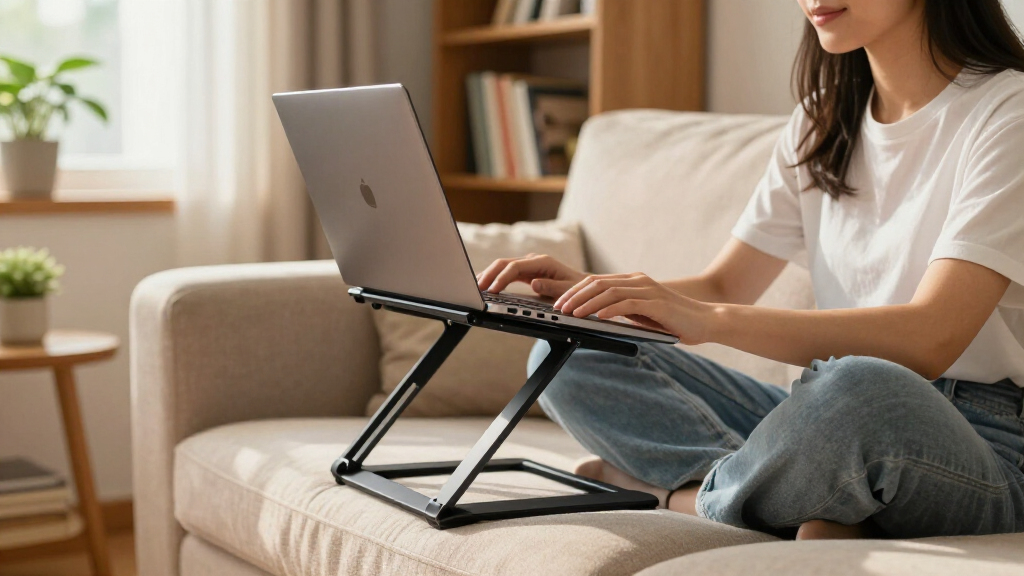
I evaluated each stand through the lens of a student’s actual week: hauling a laptop between lectures, cramming at a library desk, and late-night sessions in a dorm room. The four criteria that separated winners from the rest were height and angle adjustability (can it genuinely raise a screen to eye level, or does it just tilt?), stability under typing pressure (a stand that bounces while you type defeats its own purpose), portability (folded footprint and weight against a typical backpack), and build quality (hinge tightness over time, rubber padding, and whether the aluminum feels like it will survive a semester of daily folding).
Price-to-performance carried the most weight in ranking. A $60 stand has to justify its cost against nearly identical $20 competitors, and a cheap stand with sloppy hinges ranks below a mid-price one that holds its position firmly. I also flagged use-case fit: a rotating base, bed-friendly design, or wide laptop compatibility can move a stand up the list for the specific students who need those features, even if it loses on raw specs elsewhere.
Factors to Consider When Choosing Adjustable Laptop Stands For Students
Before picking a stand, it helps to understand what actually separates a useful one from a dust-collector. These are the factors that shaped my rankings — and the mistakes students most often make when buying.Height Range Matters More Than Tilt
The biggest mistake students make is buying a stand that only adjusts the angle, not the height. Tilting a laptop improves wrist position but does almost nothing for neck strain — the whole point of a stand is raising the top of the screen to eye level. Look for dual-hinge or telescoping designs that lift the laptop 5–8 inches above the desk, not just tilt it back. Shorter students and anyone working at a fixed-height dorm desk usually need more lift than they expect, so when in doubt, choose the stand with the taller maximum height. A stand with a wide range you don’t fully use is better than one that maxes out too low.
Stability: Where Cheap Stands Fall Apart
Hinge quality is the single biggest differentiator between a $15 stand and a $35 one, and it’s invisible in product photos. Weak hinges slowly sink under a laptop’s weight, and a bouncy platform makes typing feel unstable — a real problem during exams or long essays. Heavier aluminum builds with tight friction joints hold their position for years; thin single-sheet designs often loosen within a semester. Rotating bases add another stability variable, since the swivel mechanism introduces a second point of potential wobble. If you type hard or own a heavier 15–16 inch laptop, prioritize rigidity over every other feature.
Portability Versus Desk Setup
Be honest about how often you’ll actually fold and carry the stand. Students who move between a dorm, library, and lecture halls several times a day need a stand that folds flat and weighs under 1.5 pounds — a fixed single-piece stand will get left behind, and then it’s protecting nobody’s posture. On the other hand, if your laptop mostly lives on one desk, a heavier non-folding stand is the better buy: it’s more stable, cheaper, and never needs readjusting. The mistake to avoid is paying a portability premium you won’t use, or buying a featherweight stand for a desk that never moves.
Cooling and Laptop Longevity
Many thin student laptops throttle under sustained load, and a stand that blocks airflow makes it worse. Open-frame and ventilated designs let air circulate under the chassis, which keeps fans quieter during long sessions and may extend the laptop’s lifespan. This matters most for students in warm dorm rooms or running demanding software like video editing or engineering applications. If your laptop has a bottom-exhaust fan, check that the stand’s arms or platform won’t cover it. Solid-surface stands look cleaner but trade away this benefit entirely.
Laptop Size and Weight Limits
Almost every stand here claims to fit 10–17 inch laptops, but claimed compatibility and real-world fit are different things. A 17 inch laptop on a narrow stand overhangs the edges, blocking ports or making the setup tippy; a small 11 inch laptop can sit awkwardly on arms spaced for larger machines. Check the actual platform dimensions and weight rating, not just the advertised screen-size range, especially if you use a laptop with a case on it. Students with gaming laptops should treat the weight limit as a hard constraint, since those machines often exceed 4 pounds and strain cheap hinges.
When to Pay More (and When Not To)
Under $20, stands are largely interchangeable — you’re getting a basic riser with adequate but not great hinges. The $25–40 range is where real value lives: better machining, tighter joints, and full height adjustability without a huge markup. Above $50, you’re paying for brand polish, premium finishes, and design refinement rather than functional gains, which only makes sense for a permanent desk setup you’ll keep for years. Students on a semester-by-semester budget get the best return in the mid-range. One practical tip: buying from a seller with a solid return policy matters more than brand name at the low end, since quality control on generic stands can vary unit to unit.
Frequently Asked Questions
Is an adjustable laptop stand actually worth it for a student, or is a stack of books good enough?
A book stack raises the screen but creates two new problems: nothing stops the laptop from sliding, and you lose the stable, angled surface your wrists need. A proper stand also adds airflow under the laptop and folds into a backpack, which matters if you study in different places each week. That said, if your budget is genuinely zero, a book stack plus a separate external keyboard is ergonomically superior to a laptop flat on the desk. The stand becomes worth the money the moment you want that setup to be repeatable, portable, and stable while typing.
Do I need a separate keyboard and mouse with a laptop stand?
Yes, in almost every case. Once the screen is raised to eye level, the built-in keyboard becomes unreachable at a comfortable angle, and typing on a raised laptop forces hunched shoulders — undoing the ergonomic benefit entirely. Budget for a basic external keyboard and mouse alongside the stand, or you’ll end up lowering the stand and defeating its purpose. The one exception is a bed lap desk like the Saiji, which is designed to keep the laptop at lap height where the built-in keyboard still works. If you can only afford one accessory this month, get the keyboard first and the stand next paycheck.
Are 360° rotating bases a useful feature or a gimmick?
It depends on how you study. If you regularly turn your screen toward a classmate for group work, share lecture notes across a table, or move between two desk positions in a small room, a rotating base saves real friction several times a day. If you work solo at a fixed desk, the swivel adds nothing except a potential wobble point and a slightly higher price. Among the models here, the OMOTON and BESIGN execute the mechanism better than cheaper options where the base feels loose. Treat it as a nice bonus for collaborative students, not a reason to choose one stand over a more stable non-rotating model.
Will a folding stand wear out over a semester of daily use?
Quality varies sharply by hinge design. Friction-based hinges on well-machined aluminum stands typically hold tension for years of daily folding, while riveted or plastic-clad hinges on budget stands can loosen within months — the stand slowly sinks or drifts out of position. Two habits extend lifespan: don’t force joints past their intended range, and occasionally check that screws (if present) are tight. If you fold and unfold the stand multiple times daily, it’s worth spending an extra $10–15 on a model with a reputation for stiff, precise joints rather than replacing a sagging cheap stand mid-semester.
Which stand should I get if I mostly work from bed or the couch?
Skip the traditional risers entirely — they’re built for flat, hard desks and become tippy or unusable on a mattress. A lap desk with its own height and angle adjustment, like the Saiji, is designed for exactly this use case, with a cushioned base and a stable platform for your lap. The tradeoff is that it won’t raise the screen to true eye level, so it’s better for reading, note-taking, and casual work than marathon essay sessions. If you split time between bed and a desk, the honest answer is that you may need two tools: a lap desk for soft surfaces and a riser for the desk. For desk-only students, any of the folding risers in this roundup will serve you better.
Conclusion
For most students, the Nulaxy Ergonomic Adjustable Laptop Stand is the best overall choice — it hits the height range, stability, and price sweet spot that this category rewards. If keeping costs down is the priority, the Amazon Basics Ergonomic Stand or the generic metal risers deliver roughly 80% of the performance at half the price, and they’re a smart first stand for anyone new to ergonomic setups. For a premium, permanent desk upgrade, the Lamicall Aluminum Stand is the most polished option here, though you give up height adjustability for its rock-solid single-piece design. Students who work from bed should go straight to the Saiji Lap Desk, since no desk riser can substitute for it, and group-study frequenters will appreciate the rotating bases on the OMOTON LA10 or BESIGN LSX7. Whatever you choose, pair it with an external keyboard — that combination, not the stand alone, is what actually fixes your posture over a four-year degree.
Evergreen bestsellers Picks
bestsellers
As an affiliate, we earn on qualifying purchases.