This checklist is for anyone putting together a comfortable home media room and desk setup, whether you split your time between focused work and watching shows or simply want the essentials in one space. It brings together seating, monitor support, sound, light control, cable organization, and room lighting.

Get business pricing on your home office setup
- Business-only prices and quantity discounts
- Tax-exempt purchasing
- Multiple users, one account, clear invoices
The sections are organized by the role each item plays: start with your chair and desk layout, then consider sound and window coverage, and finish with cable management and lighting. Each section pairs the named pick with practical points to check before you buy.
Use the checklist to compare each item with your room, equipment, and daily routine. Confirm dimensions and compatibility from the product listing, especially for chair sizing, monitor mounts, curtains, and under-desk clearance. You can prioritize the items that address your biggest comfort or setup needs first.
Ergonomic Office Chair
A chair is a central part of a desk setup because it affects how comfortably you can work through a typical day. The listed pick is the Herman Miller Aeron Ergonomic Chair, Size B, Graphite. Before choosing it, check the product listing’s sizing guidance and compare it with your body measurements and the desk you use. Size B is part of the product name, but that alone does not establish a fit for every person.
A common buying mistake is choosing a chair based on its appearance or reputation without checking its dimensions and adjustment options. Review the listed seat and overall measurements, and make sure the chair can fit beneath your desk with room to move. If possible, consider whether the seat height and arm position work with your desk and preferred posture. Also check the return and assembly details in the listing so you understand what to expect if the fit is not right.
Fit comes first: measure your workspace and use the manufacturer’s sizing information before deciding. Graphite may suit a range of desk styles, but coordinate it with the rest of your room only after confirming the chair works for you.
What to look for:
- Compare your measurements with the manufacturer’s Size B guidance.
- Check chair dimensions against desk height and available floor space.
- Review the listed adjustment features and whether they suit your posture.
- Confirm arm clearance beneath or beside your desk.
- Read assembly and return details before ordering.
Herman Miller Aeron Ergonomic Chair, Size B, Graphite
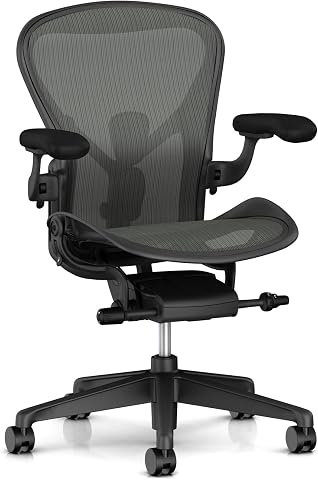
The Aeron chair features an 8Z Pellicle suspension seat and back, adjustable PostureFit SL lumbar support, and fully adjustable arms. Recline tension, tilt range, and seat angle can be adjusted, and the chair arrives fully assembled.
Pros:
- Adjustable lumbar support with independently adjustable pads
- Adjustable arms move in height, depth, and angle
- Seat angle, recline range, and recline tension are adjustable
- Arrives fully assembled
Cons:
- No cons stated in the provided product content
Best for: People whose measurements align with the manufacturer’s Size B guidance
Not ideal for: Anyone who has not checked the chair’s fit against their body and desk
Bottom line: Confirm the sizing and workspace fit before making the Aeron the foundation of your desk setup.
Dual Monitor Stand
A dual monitor stand can help organize a desk around two screens, but the important first step is confirming that it supports your particular monitors. This checklist’s pick is the HUANUO Dual Monitor Stand (HNDS7). Check the product listing for supported screen sizes, weight limits, mounting pattern, and the number of screens it accommodates. Those details determine whether the stand is compatible with your equipment.
A frequent mistake is assuming that two monitors with similar screen sizes will fit any dual stand. Their weights, mounting points, and shapes can differ, and a monitor without a compatible mounting pattern may need a separate adapter. Measure the desk area and check how the stand attaches: desk thickness, edge shape, and underside clearance can affect installation. Think through where the screens should sit relative to your chair, keyboard, and nearby shelves before committing to a position.
Check the mount and desk together before ordering. If your screens have different sizes or weights, verify each one against the stand’s limits and review the manufacturer’s installation instructions. Planning the layout first can help you avoid a stand that fits the listing description but not your actual desk setup.
What to look for:
- Confirm each monitor’s weight and screen size against the listing’s limits.
- Check whether both monitors have compatible mounting points.
- Verify desk thickness and attachment requirements.
- Measure the available desk depth and width for the planned screen position.
- Review installation instructions and any separately required adapters.
HUANUO Dual Monitor Stand (HNDS7)
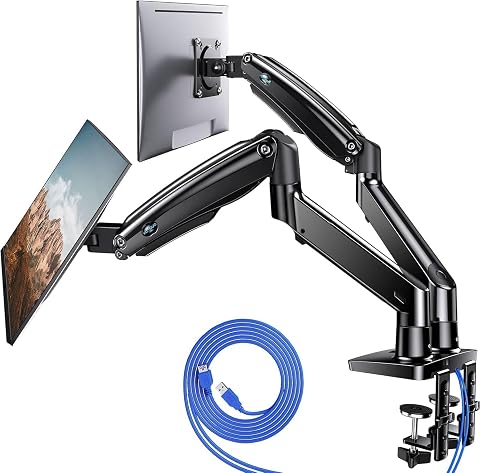
This premium dual monitor mount features solid aluminum arms and a dual C-clamp design, supporting two monitors from 13" to 40" weighing up to 26.4 lbs each. It offers full motion adjustments including 360° rotation, tilt, and swivel, along with integrated USB ports and cable management for a clutter-free workspace.
Pros:
- High weight capacity (26.4 lbs per arm) suitable for large or ultrawide monitors
- Extensive range of motion with 360° rotation and significant height/depth adjustment
- Includes built-in USB ports for convenient device charging
- Effective cable management system keeps the desk organized
Cons:
- Requires specific desk thickness (up to 3.54") and grommet hole size for installation
- Assembly may be complex due to multiple adjustment mechanisms
Best for: Desk users with two monitors that meet the stand’s stated requirements
Not ideal for: Anyone whose monitor or desk compatibility is still unknown
Bottom line: Match both monitors and the desk to the HNDS7 specifications before planning around it.
Soundbar with Subwoofer
Sound is a key part of a media room, and a soundbar with a subwoofer can be a practical option when you want to build out the TV area. The listed pick is named Soundbar with Subwoofer for TV, Home Theater Bluetooth 5.3 Speaker Sys. Because the product name is abbreviated, use the full listing to confirm the exact included components, connection options, and supported devices before buying.
A common mistake is treating a feature in a product title as proof that the soundbar will work with every television or setup. Check which audio connections the listing specifies and compare them with the ports on your TV. If you intend to use Bluetooth, confirm the stated compatibility and how the connection is set up. Measure the space beneath or near your television, and check the soundbar and subwoofer dimensions so both components can be placed where you want them.
Confirm connections and placement as a pair: a suitable connection does not help if the components cannot fit in the room. Review the included accessories and setup requirements in the full product listing, and consider where power outlets and cables will be available. That helps you decide whether this pick fits your media-room layout.
What to look for:
- Read the full listing to confirm exactly which components are included.
- Match the listed audio connections to your television’s available ports.
- Check Bluetooth compatibility if you plan to use that connection.
- Measure the TV area and intended subwoofer location.
- Review power, cable, and setup requirements.
Soundbar with Subwoofer for TV, Home Theater Bluetooth 5.3 Speaker System with W

This 2.1-channel soundbar system delivers immersive surround sound with a deep bass subwoofer, ideal for movies, music, and karaoke. It includes wireless microphones, multiple sound modes, and versatile connectivity options, making it perfect for home entertainment and gatherings.
Pros:
- Powerful 2.1-channel surround sound with deep bass
- Includes wireless microphones for karaoke and singing
- Multiple sound modes and adjustable bass for versatile listening
- Easy connection options with remote control
Cons:
- Requires space for the subwoofer
- Limited to 240W power, may not suit very large rooms
- Wireless microphones may have limited range in some environments
Best for: People whose TV connections and room layout match the full listing
Not ideal for: Anyone who has not confirmed the included components and connection details
Bottom line: Check the complete product details and your TV ports before choosing this soundbar system.
Blackout Curtains
Window coverage matters when you want to manage incoming light in a media room or work area. The named pick is the Moondream DecibelControl 3-in-1 Soundproof Curtain, 55" W x 84" L, Whi. The title supplies a panel width and length, but measure your window and intended coverage rather than assuming those dimensions will suit it. The listing is truncated, so check its full details for color, panel quantity, installation method, and the meaning of the product’s 3-in-1 description.
A frequent buying mistake is measuring only the glass. Curtain coverage also depends on the area around the window, the rod or track placement, and how much fabric you want across the opening. Check whether the stated width applies to one panel or a set, and confirm the finished dimensions in the full listing. If you are fitting more than one window, measure each separately. Also confirm that the curtain can attach to your existing hardware or identify what additional hardware the listing requires.
Measure the full coverage area before selecting a curtain. The product name includes soundproof wording, but rely on the listing for its specific features and installation guidance rather than assuming a particular result. Check the complete color description as well, since the abbreviated title ends at “Whi.”
What to look for:
- Measure the window and the area you want the curtain to cover.
- Confirm whether 55 inches refers to one panel or the total set width.
- Verify the full length and color in the product listing.
- Check the curtain’s attachment style against your rod or track.
- Review the listing’s explanation of the 3-in-1 designation and included hardware.
Moondream DecibelControl 3-in-1 Soundproof Curtain, 55" W x 84" L, White – Snow

The Moondream DecibelControl curtain offers a 3-in-1 solution with soundproofing, thermal insulation, and blackout capabilities. Made with high-quality European fabrics, it reduces noise by up to 10 decibels and helps regulate indoor temperature, suitable for bedrooms, living rooms, or home offices.
Pros:
- Provides effective noise reduction up to 10 decibels
- Combines blackout, thermal insulation, and soundproofing in one curtain
- Made with high-quality European fabrics ensuring durability and standards
- Suitable for various rooms including bedrooms and home offices
Cons:
- Dry clean only, which may be inconvenient for some users
- Limited color options (only available in white – Snow)
- Weight of 2.2 pounds may require sturdy curtain rods
Best for: People whose window and hardware match the listed curtain dimensions and attachment
Not ideal for: Anyone choosing before confirming panel count, color, and installation details
Bottom line: Verify the full listing and measure the intended coverage area before ordering.
Cable Management Tray
Cable organization can make a desk area easier to maintain, especially when devices and power connections gather beneath the work surface. This checklist’s pick is the Ascrono Original Under Desk Cable Management Tray, Black, 40.6 inches. The listed length gives you a useful starting point, but check the full dimensions and mounting method against your desk before choosing it.
A common mistake is focusing only on tray length. The underside of a desk may have a frame, drawers, crossbars, or other obstructions that affect where a tray can go. Measure the clear mounting area and confirm that the attachment method suits the desk material and thickness. Consider the cables and power equipment you plan to place inside, and check the listing for the tray’s width, depth, and any capacity guidance. Leave enough room for cables to reach their devices without being pulled tight.
Check underside clearance first so the tray can be installed where it will actually help. If you plan to route cables toward a wall outlet, map that path before installation and make sure it will not interfere with your chair or leg space. Use the product instructions to confirm which hardware is supplied and what tools or additional parts may be needed.
What to look for:
- Measure the clear underside area and compare it with the tray’s full dimensions.
- Check how the tray attaches and whether the method suits your desk.
- Look for desk frames, drawers, or crossbars that could block installation.
- Confirm the listed capacity and whether your equipment will fit.
- Plan cable routes while preserving legroom and access to outlets.
Ascrono Original Under Desk Cable Management Tray, Black, 40.6 inches

This under desk cable management tray conceals cords, power strips, and adapters, keeping your workspace tidy and organized. Made from fire-retardant fabric, it supports up to 66 lbs and offers versatile mounting options for various desk setups.
Pros:
- Conceals cords and power strips for a tidy workspace
- Supports a large capacity for multiple devices
- Easy to install with versatile mounting options
Cons:
- Limited to a length of 40.6 inches, may not fit larger desks
- Fabric material may wear over time with heavy use
Best for: People with enough clear underside space for the tray’s dimensions
Not ideal for: Anyone whose desk mounting area or cable load has not been measured
Bottom line: Measure the desk underside and review the attachment details before selecting this tray.
Adjustable Floor Lamp
A floor lamp can add a separate source of light to a desk or media room, and an adjustable design may help you direct it where it is useful. The listed pick is the Syrinx LED Floor Lamp, 18W 2000LM Bright Floor Lamp for Office and Liv. Since the product name is cut off, read the full listing to confirm its complete features, adjustment range, controls, and dimensions.
A common mistake is buying a lamp based on a brightness figure alone without considering where it will stand or how light reaches the work surface. Measure the available floor space and check the lamp’s height and base dimensions. Think about whether the adjustment range can place light where you need it without shining toward a screen or into your eyes. Review the listed controls and power requirements, and check whether the lamp’s design suits the outlet location and the room’s layout.
Plan the placement first, especially in a compact room where the base could interfere with a desk chair or walkway. Check the full listing for the lamp’s light settings and adjustment details rather than inferring them from the abbreviated title. A careful fit check helps you choose a lamp that complements the way you use the room.
What to look for:
- Confirm the full lamp height and base dimensions.
- Measure floor space near the desk or seating area.
- Check the adjustment range and controls in the complete listing.
- Review power requirements and the location of nearby outlets.
- Plan placement to keep walkways and chair movement clear.
Syrinx LED Floor Lamp, 18W 2000LM Bright Floor Lamp for Office and Living Room
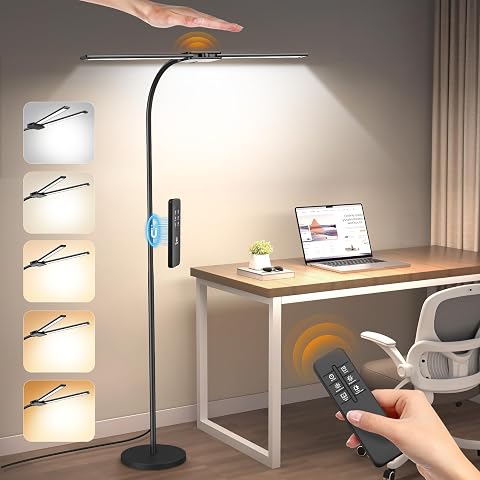
This LED floor lamp features 50 light modes, adjustable brightness, and color temperature, with a 360° gooseneck and foldable arms for versatile lighting. It is energy-efficient, eye-caring, and suitable for various spaces like living rooms, bedrooms, and offices.
Pros:
- Highly adjustable with 50 light modes and multiple brightness levels
- Energy-efficient and eye-caring with uniform soft light
- Versatile with a wide lighting area suitable for various activities
- Convenient gesture and remote control operation
Cons:
- Remote control and gesture sensing may occasionally malfunction
- Complex feature set might be overwhelming for some users
Best for: People who have a measured spot and lighting direction in mind
Not ideal for: Anyone relying on the abbreviated name to confirm adjustment features
Bottom line: Check the full specifications and map out the lamp’s floor placement before buying.
If you are buying in stages, start with the items that address your biggest daily need: chair fit for desk comfort, monitor support for a two-screen layout, or sound equipment for the TV area. Next, add window coverage and cable organization based on your room measurements. Treat the lamp as a placement decision, checking that it fits your remaining floor space and lighting needs.
A few careful measurements can make the whole setup work better together. Confirm product details against your own desk, screens, TV, windows, and room layout, then build the space one well-matched item at a time.
Columbus Day / Indigenous Peoples' Day Picks
long weekend sales
As an affiliate, we earn on qualifying purchases.