
Shopping for home theater projectors in 2026 means choosing between image technology, brightness, and smart features — and those tradeoffs decide whether movies look cinematic or washed out. My top pick overall is the Optoma UHZ36, a 4K laser projector that delivers razor-sharp HDR detail without the lamp-replacement headaches of traditional models. If you want the biggest visual step-up for a dedicated dark room, the Epson Home Cinema 3800 with its 3-chip 3LCD engine produces richer color that single-chip DLP can’t match, while the Google TV 14.0 Smart Projector is the easiest all-in-one option for anyone who hates external streaming sticks. The main tension in this category: brighter lamp projectors like the ViewSonic models win in living rooms with ambient light, but laser and 3LCD units win on color accuracy, contrast, and long-term cost. Keep reading for the full breakdown of all 11 models and which one fits your space.

Get business pricing on your home office setup
- Business-only prices and quantity discounts
- Tax-exempt purchasing
- Multiple users, one account, clear invoices
Complete the kit


Key Takeaways
- Laser light sources (Optoma UHZ36, ViewSonic LS740HD) outlast lamp-based models by 15,000+ hours and hold brightness longer, which justifies their premium if you watch frequently.
- Epson‘s 3-chip 3LCD projectors (Home Cinema 3800, 1100, 980) eliminate the rainbow artifacts common to single-chip DLP, making them the safer bet for sensitive viewers and color-critical movie watching.
- The brightest spec on paper isn’t the best picture: the 5500-lumen ViewSonic LS740HD is built for lights-on versatility, while lower-lumen 4K models look better in a darkened theater room.
- All-in-one smart projectors with built-in streaming (Google TV and VIDAA OS models) trade peak image quality for convenience — best as secondary or portable setups, not dedicated home theaters.
- Budget 1080p DLP picks like the Optoma HD146X and ViewSonic PA503HD remain the smartest entry points, delivering 90% of the big-screen experience at a fraction of 4K laser pricing.




| home theater projector | Resolution | Brightness | Connectivity |
|---|---|---|---|
| ViewSonic PX700HDH 1080p Proje | 1920×1080 (Full HD) | 3,700 ANSI lumens | Dual HDMI, USB, Mini USB |
| Smart 4K Projector with WiFi | — | 550 lumens | HDMI, Bluetooth 5.4, Wi-Fi 6, 3.5mm audio |
| Outdoor 4K Projector with VIDA | Native 1080P with 4K decoding | 920 ANSI lumens | Wi-Fi 6, Bluetooth 5.4, HDMI ARC & CEC, USB |
| ViewSonic PA503HD 4000 Lumens | 1920×1080 (Full HD) | 4,000 ANSI lumens | 2× HDMI, USB-A |
| Google TV 14.0 Smart Projector | Native 1080P with 4K decoding | 1,100 ANSI lumens | Wi-Fi 6, Bluetooth, HDMI 2.1 ARC, USB |
| Optoma UHZ36 4K UHD Laser HDR | 4K UHD | — | — |
| ViewSonic LS740HD 1080P Laser | 1080p Full HD (1920×1080) | 5,500 ANSI lumens | — |
| Epson Home Cinema 1100 3-Chip | 1080p | 3,400 lumens | 2 HDMI ports, USB port |
| Epson Home Cinema 3800 4K PRO- | 4K PRO-UHD | 3,000 lumens | — |
| Epson Home Cinema 980 3-Chip 3 | 1080p | 4,000 lumens | 2 HDMI ports, USB port |
| Optoma HD146X 1080P Full HD Ho | 1080p Full HD | — | HDMI input for external sources |
More Details on Our Top Picks
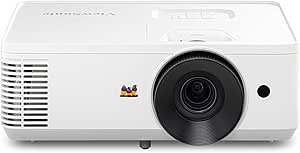
ViewSonic PX700HDH 1080p Projector with 3700 Lumens and Dual HDMI
Brightness is the whole story here, and it’s what separates the PX700HDH from the smart-LED crowd like the Google TV 14.0 projector, which needs a dark room to shine. At 3,700 ANSI lumens with a 22,000:1 contrast ratio, this model holds a watchable picture with lamps on or blinds open — something the 550–1,100 lumen portables simply can’t do. The tradeoff is simplicity: there’s no smart OS, no streaming apps, no auto-focus. You’ll plug in a streaming stick or console via the dual HDMI ports and manage keystone manually. Compared with its sibling, the ViewSonic PA503HD, this one prioritizes home theater contrast over the PA503HD’s presentation-friendly flexibility and lower input lag focus.
Pros:- 3,700 ANSI lumens handles ambient light far better than portable LED projectors
- 22,000:1 contrast ratio produces deep blacks for a lamp-based 1080p unit
- Dual HDMI plus USB makes console and streaming-stick hookup simple
- Up to 300-inch projection for genuinely immersive home theater
Cons:- No smart platform — you must supply your own streaming source
- Long throw ratio means smaller rooms will struggle to get a big image
Best for: Buyers with living rooms that can’t be fully darkened who still want a big, punchy movie picture
Not ideal for: Anyone wanting an all-in-one streaming solution — this has no built-in apps or smart features
- Resolution:1920×1080 (Full HD)
- Brightness:3,700 ANSI lumens
- Contrast Ratio:22,000:1
- Throw Ratio:1.5–1.6
- Projection Size:80–150 inches (up to 300)
- Connectivity:Dual HDMI, USB, Mini USB
- Lamp Life:Up to 20,000 hours
Our verdict“The right choice if your theater doubles as a family living room where lights stay on.”
Smart 4K Projector with WiFi, Bluetooth, AI Auto Focus, Keystone, HDR10, Dolby Audio, and Built-in Apps
This projector bets everything on convenience over raw performance, and for casual viewers that bet pays off. With VIDAA OS, 1,200+ apps including Netflix built in, AirPlay, voice control, and 6D auto keystone, it’s genuinely plug-and-play — no streaming stick needed, unlike the ViewSonic PX700HDH. The catch is the 550-lumen output, which is a fraction of what dedicated home theater models deliver. This is a dark-room or backyard-after-sunset device, full stop. Native 1080P with 4K support and MEMC smoothing keeps images looking clean, but cinephiles comparing it against the Optoma HD146X will notice the gap in punch and motion clarity. What you’re buying is an appliance-like experience, not reference picture quality.
Pros:- Full smart OS with Netflix, Disney+, Prime Video and 1,200+ apps built in
- AI auto-focus and 6D keystone make setup nearly effortless
- Wi-Fi 6, Bluetooth 5.4, and AirPlay cover every streaming path
- Quiet 28 dB operation won’t distract during quiet scenes
Cons:- 550 lumens is dim by any home theater standard — dark rooms only
- No battery, so ‘portable’ still means finding an outlet outdoors
Best for: Casual streamers and occasional outdoor movie hosts who value one-box simplicity over image performance
Not ideal for: Dedicated home theater enthusiasts — 550 lumens can’t compete with lamp or laser projectors in any lit room
- Native Resolution:1920 x 1080 (4K support)
- Brightness:550 lumens
- Display Type:LCD
- Smart Platform:VIDAA OS, 1,200+ apps
- Connectivity:HDMI, Bluetooth 5.4, Wi-Fi 6, 3.5mm audio
- Max Image Size:300 inches
- Noise Level:28 dB
Our verdict“A streaming-first projector for laid-back viewers who prioritize apps and ease over brightness.”
Outdoor 4K Projector with VIDAA OS, HDR10, WiFi6, Bluetooth, and AI Auto Focus
Think of this as the outdoor-ready sibling to the 550-lumen smart projector above it: nearly double the brightness at 920 ANSI lumens, plus dual 20W Dolby Audio speakers loud enough to fill a backyard without external sound. That audio alone justifies it for outdoor use, where the ViewSonic PX700HDH’s unspecified speakers would leave you hauling out a soundbar. The smart platform carries Netflix, YouTube, and 1,000+ live channels, and obstacle avoidance plus auto-focus means you can set it on a patio table and start watching in minutes. The honest limitation: it’s a native 1080P panel decoding 4K, not true 4K like the Optoma UHZ36, and twilight-plus viewing is still the realistic ceiling for brightness.
Pros:- 920 ANSI lumens handles dusk and dim outdoor conditions
- Dual 20W Dolby Audio speakers eliminate the need for external sound outdoors
- Obstacle avoidance and auto-focus speed up uneven-surface setups
- HDMI ARC, Wi-Fi 6, and AirPlay 2 support cover flexible source options
Cons:- 4K label reflects decoding, not native UHD resolution
- Menu and smart-feature setup can frustrate non-technical users
Best for: Backyard movie-night hosts who need bright output, loud built-in sound, and app access without extra gear
Not ideal for: 4K purists — this decodes 4K onto a 1080P panel rather than displaying true UHD
- Resolution:Native 1080P with 4K decoding
- Brightness:920 ANSI lumens
- HDR:HDR10
- Speakers:2×20W with Dolby Audio
- Smart Platform:VIDAA OS, 1,000+ live channels
- Connectivity:Wi-Fi 6, Bluetooth 5.4, HDMI ARC & CEC, USB
- Warranty:3 years
Our verdict“The strongest all-in-one pick for outdoor screenings where speakers and brightness matter most.”
ViewSonic PA503HD 4000 Lumens 1080p Full HD DLP Projector
While the PX700HDH leans cinematic, the PA503HD is built around motion: 120Hz refresh and 16ms input lag make it the clear pick in this batch for fast gaming or live sports, where cheaper smart projectors smear the action. At 4,000 ANSI lumens it’s also the brightest of the five, edging out its ViewSonic sibling by 300 lumens for daytime viewing. Like the PX700HDH, it ships with no smart features and no meaningful built-in audio, so budget for a soundbar and a streaming device. The unspecified contrast ratio is a soft spot too — dark-scene depth likely trails the PX700HDH’s 22,000:1 figure. This is a dumb, fast, bright panel waiting for you to build a system around it, and that’s exactly its appeal for gamers.
Pros:- 16ms input lag and 120Hz refresh deliver responsive big-screen gaming
- 4,000 ANSI lumens is the brightest output in this batch
- Auto-keystone and 1.1x optical zoom simplify placement
- Dual HDMI ports handle console plus streaming stick simultaneously
Cons:- No smart OS or credible built-in audio — external gear required
- Contrast ratio isn’t published, raising questions about dark-scene performance
Best for: Console gamers and sports fans who need low input lag and high refresh rates on a huge screen
Not ideal for: Movie-first viewers who want built-in streaming and audio — this is a bare-bones display unit
- Resolution:1920×1080 (Full HD)
- Brightness:4,000 ANSI lumens
- Input Lag:16ms
- Refresh Rate:120Hz
- Throw Ratio:1.4–1.6
- Connectivity:2× HDMI, USB-A
- Zoom:1.1x optical
Our verdict“The performance-first choice for gamers who’d rather add their own streaming and sound than compromise on speed.”
Google TV 14.0 Smart Projector with 4K Support, 1100 ANSI, Dolby Audio, WiFi 6, Bluetooth, Auto Focus
This one earns its spot through software and color: Google TV 14.0 with personalized recommendations, voice control, 32GB of storage, and a 99% wide color gamut that gives it the richest, most accurate color rendering of any smart projector in this group. At 1,100 ANSI lumens it outshines both VIDAA-based models, closing much of the gap to lamp-based units like the ViewSonic PA503HD while keeping the auto-focus, auto-keystone, obstacle-avoidance convenience those ViewSonics lack. The 30W Dolby Audio system is a genuine step up from the outdoor model’s sound, and HDMI 2.1 with ARC rounds out future-proof connectivity. Just know the familiar caveat: 4K here means decoding onto a 1080P panel, and lamp life figures aren’t published — a durability question mark over a three-year warranty.
Pros:- 99% wide color gamut delivers noticeably richer color than competing smart projectors
- Google TV 14.0 with voice control and 32GB storage feels polished and fast
- 1,100 ANSI lumens is the brightest smart option in this batch
- 30W Dolby Audio plus HDMI 2.1 ARC offers real home theater connectivity
Cons:- 4K content displays at native 1080P resolution
- Lamp life and long-term durability specs aren’t published
Best for: Smart-home households already in the Google ecosystem who want voice-driven, app-loaded projection with strong color
Not ideal for: Viewers who want true 4K output or long-term durability data before committing
- Brightness:1,100 ANSI lumens
- Resolution:Native 1080P with 4K decoding
- HDR:HDR10
- Speakers:30W Dolby Audio
- Smart Platform:Google TV 14.0
- Storage:2GB RAM + 32GB storage
- Connectivity:Wi-Fi 6, Bluetooth, HDMI 2.1 ARC, USB
- Color Gamut:99% wide color gamut
- Warranty:3 years
Our verdict“The best pick for Google-centric homes that want a polished smart experience with unusually strong color for the category.”
Optoma UHZ36 4K UHD Laser HDR Home Theater Projector
Most projectors in this roundup still rely on lamps, which means dimming output and eventual replacement costs. The Optoma UHZ36 takes a different route with a laser light source, which holds its brightness far longer and turns on instantly without a warm-up period. Compared with the Epson Home Cinema 3800, which delivers excellent 4K PRO-UHD imaging but uses a traditional lamp, the UHZ36 is the pick for buyers who project frequently and don’t want maintenance hanging over their heads.
The Filmmaker Mode is the standout for serious movie nights — it disables frame interpolation and other processing so content plays back the way the director intended. The tradeoff is real, though: you give up the Epson’s lens shift flexibility, and there’s no built-in speaker here, so an external sound system is basically mandatory.
Pros:- True 4K UHD resolution with genuine pixel detail
- Laser light source avoids lamp replacements and slow warm-ups
- Filmmaker Mode preserves the director’s intended look
- HDR support adds depth to compatible content
Cons:- No built-in speaker, so audio requires external hardware
- Laser technology commands a premium over lamp-based rivals like the Epson Home Cinema 980
- Less flexible placement than lens-shift-equipped competitors
Best for: Movie enthusiasts who watch frequently and want a maintenance-free laser light source with faithful color reproduction
Not ideal for: Buyers wanting an all-in-one solution — the lack of built-in audio means you’ll need a separate sound system from day one
- Resolution:4K UHD
- Light Source:Laser
- HDR Support:Yes
- Picture Mode:Filmmaker Mode
- Built-in Speaker:No
- Best Use:Dedicated home theater
Our verdict“Choose the UHZ36 if you’re building a dedicated, amp-driven theater and want laser reliability for years of heavy use.”
ViewSonic LS740HD 1080P Laser Projector
If your living room has windows you can’t black out, most projectors in this lineup will wash out by mid-afternoon. At 5,500 ANSI lumens, the ViewSonic LS740HD is the brightest option here by a wide margin — the Epson Home Cinema 1100 manages 3,400 lumens and the Home Cinema 980 hits 4,000, and both are noticeably more dependent on light control. The LS740HD shrugs off ambient light and fills screens up to 150 inches without losing punch.
Installation flexibility is another strength: a 1.3x optical zoom, horizontal and vertical keystone, and even portrait projection mean awkward rooms aren’t dealbreakers. The compromise is resolution — you’re getting 1080p, not the 4K of the Optoma UHZ36, and at this price that stings if your screen is smaller than 120 inches. Brightness-first buyers, however, won’t find a better match.
Pros:- Class-leading 5,500 lumens for daytime and ambient-light viewing
- Laser light source with no lamp replacements
- 1.3x optical zoom plus keystone for flexible placement
- Supports screens up to 150 inches
Cons:- 1080p resolution at a price point where 4K rivals exist
- Large-screen setups demand serious throw distance and wall space
- Setup options add complexity for casual users
Best for: Owners of bright, hard-to-darken living rooms who want a huge picture that survives daytime viewing
Not ideal for: 4K purists with a dark dedicated theater — the resolution ceiling undercuts its premium price in light-controlled rooms
- Resolution:1080p Full HD (1920×1080)
- Brightness:5,500 ANSI lumens
- Light Source:Laser
- Throw Ratio:1.1–1.5
- Screen Size:Up to 150 inches
- Optical Zoom:1.3x
- Keystone Correction:Horizontal and vertical
- Projection Modes:360-degree and portrait
- Mounting:Ceiling mount compatible
Our verdict“The LS740HD makes sense when fighting daylight matters more than pixel count — dark-room buyers should look elsewhere.”
Epson Home Cinema 1100 3-Chip 3LCD 1080p Home Theater Projector
Most projectors here treat streaming as an afterthought — you plug in a stick and hope for the best. The Epson Home Cinema 1100 builds it in with Apple AirPlay and Miracast, so phones and laptops connect without dongles cluttering the HDMI ports. Compared with the Epson Home Cinema 980, its sibling in this lineup, the 1100 trades a little brightness (3,400 vs. 4,000 lumens) for that native wireless capability, and gives up the 980’s built-in speaker entirely.
The 3-chip 3LCD design is what earns its place: unlike single-chip DLP projectors such as the ViewSonic PA503HD, it produces zero rainbow artifacts and renders color that holds up during fast motion. With 3,400 lumens it handles modest ambient light fine, though not the daylight resilience of the ViewSonic LS740HD. Plan on external audio — this one is silent out of the box.
Pros:- Native AirPlay and Miracast wireless streaming
- 3-chip 3LCD color with no rainbow artifacts
- 3,400 lumens handles rooms with some ambient light
- Two HDMI ports plus USB for flexible source connections
Cons:- No built-in speaker at all
- 1080p only, while similarly priced rivals like the Optoma UHZ36 offer 4K
- Less bright than its own sibling, the Home Cinema 980
Best for: Cord-cutters and Apple-device households who want to cast content straight to a big screen without extra hardware
Not ideal for: Anyone expecting sound from the projector itself — no built-in speaker means a soundbar or receiver is required
- Resolution:1080p
- Brightness:3,400 lumens
- Technology:3-Chip 3LCD
- Wireless Streaming:Apple AirPlay, Miracast
- Connectivity:2 HDMI ports, USB port
- Built-in Speaker:No
Our verdict“The Home Cinema 1100 is the easiest path from phone to 100-inch picture — just budget for speakers.”
Epson Home Cinema 3800 4K PRO-UHD 3-Chip 3LCD Projector with HDR
When the goal is the best image a home theater can produce in this lineup, the Epson Home Cinema 3800 is the one to beat. Full 10-bit HDR, a 100,000:1 contrast ratio, and 3-chip 3LCD color put it ahead of the Optoma UHZ36 on outright black level and saturation, even though the Optoma’s laser source will outlast the Epson’s lamp. The precision glass lens with lens shift is a genuine differentiator — it lets you position the projector off-center and still get a perfectly geometric image, something neither the Home Cinema 980 nor the Home Cinema 1100 can do.
It’s also the only model here with active 3D support and 18 Gbps HDMI 2.0 inputs for full-bandwidth 4K sources. The downsides: it’s physically large, the 3,000-lumen output needs reasonable light control, and the built-in stereo speakers are a convenience rather than a feature. This is a cinema-room machine, not a living-room all-rounder.
Pros:- Best-in-lineup contrast and 10-bit HDR image quality
- Lens shift enables flexible, off-center placement
- Active 3D support and full 18 Gbps HDMI 2.0 inputs
- Built-in stereo speakers for stand-alone use
Cons:- Lamp-based light source will dim over time unlike the Optoma UHZ36’s laser
- Bulky chassis demands dedicated space
- Premium price for a 1080p-native panel with pixel-shifting to 4K
Best for: Home theater enthusiasts with a light-controlled room who want reference-grade 4K HDR image quality
Not ideal for: Casual or daytime viewers — at 3,000 lumens it can’t compete with the ViewSonic LS740HD in bright rooms
- Resolution:4K PRO-UHD
- Brightness:3,000 lumens
- Contrast Ratio:100,000:1
- HDR:Full 10-bit HDR
- HDMI Support:18 Gbps HDMI 2.0
- Lens:Precision glass with lens shift
- 3D Support:Active 3D
- Speakers:2 x 10 W stereo
Our verdict“If picture quality is the whole point of your theater, the 3800 is worth the premium — just keep the room dark.”
Epson Home Cinema 980 3-Chip 3LCD 1080p Movie Projector
Not everyone wants to research throw ratios and mount brackets — some buyers just want to plug in, point, and watch. That’s where the Epson Home Cinema 980 shines. It pairs a bright 4,000-lumen lamp with 3-chip 3LCD color and a built-in speaker, meaning it works out of the box with nothing else to buy. Its sibling, the Epson Home Cinema 1100, adds wireless streaming but drops the speaker and 600 lumens of brightness — the 980 is the simpler, more self-contained choice.
At 4,000 lumens it outshines the Epson Home Cinema 3800 by a wide margin, so sports and casual daytime viewing are comfortably in scope. What you sacrifice is precision: there’s no lens shift, limited positioning flexibility, and the resolution ceiling is 1080p. For movie nights where convenience outranks cinematic refinement, that’s a fair trade.
Pros:- 4,000 lumens handles daytime sports and gaming sessions
- Built-in speaker removes the need for external audio
- 3LCD color accuracy with no rainbow artifacts
- Simple connectivity with dual HDMI and USB
Cons:- No lens shift or optical zoom for precise placement
- 1080p resolution limits fine detail on screens over 120 inches
- Built-in speaker won’t satisfy anyone serious about sound
Best for: First-time projector owners and casual households who want a bright, self-contained setup with no external audio needed
Not ideal for: Enthusiasts with dedicated theaters — no lens shift and 1080p resolution cap its performance ceiling well below the Home Cinema 3800
- Resolution:1080p
- Brightness:4,000 lumens
- Technology:3-Chip 3LCD
- Connectivity:2 HDMI ports, USB port
- Built-in Speaker:Yes
- Lens Shift:No
Our verdict“The Home Cinema 980 is the least-fuss entry point into big-screen viewing — ideal for casual use, not cinephile setups.”
Optoma HD146X 1080P Full HD Home Theater Projector
Among a lineup crowded with smart platforms and laser light sources, the Optoma HD146X earns its spot by doing one thing well: straightforward 1080p projection at an accessible price. Where the Google TV 14.0 Smart Projector layers on streaming apps and auto focus, the HD146X strips things back to a simple lamp-based DLP design that plugs into whatever source you already own — a Blu-ray player, console, or streaming stick. That simplicity is a genuine advantage for buyers who don’t want to manage another operating system.
Compared with the ViewSonic PA503HD, Optoma’s game display mode gives it an edge for console gamers who want snappier response without stepping up to a premium model like the Epson Home Cinema 3800. The tradeoff is real: no smart features, no 4K support, and a lamp that will dim over time unlike the laser-driven ViewSonic LS740HD. This is a bare-bones movie machine, and it owns that identity.
Pros:- Full HD 1080p DLP imaging that produces sharp, colorful movie playback in dark rooms
- Dedicated game display mode reduces input lag for console gaming sessions
- Simple, quick installation with straightforward keystone and zoom controls
- HDMI connectivity makes it easy to pair with any streaming stick or Blu-ray player
Cons:- Lamp-based light source dims over time and requires eventual replacement, unlike laser rivals such as the ViewSonic LS740HD
- No smart platform, apps, or WiFi — you must supply your own content source
- Lacks 4K support and HDR, so it falls behind the Optoma UHZ36 for future-proofing
Best for: Movie fans and console gamers building a dedicated dark-room theater on a tight budget with external streaming devices
Not ideal for: Buyers who want built-in streaming apps, 4K resolution, or a set-and-forget laser light source — this projector will frustrate them
- Resolution:1080p Full HD
- Display Technology:DLP
- Light Source:Lamp-based
- Special Modes:Game display mode
- Connectivity:HDMI input for external sources
- Smart Features:None — external streaming device required
- Best Use Environment:Light-controlled, dark home theater rooms
Our verdict“The HD146X is the right choice if you want clean, lag-friendly 1080p movie and gaming projection without paying for smart features you’ll never use.”

How We Picked
My ranking logic starts with image quality in realistic home theater conditions — contrast, color accuracy, and resolution matter more than raw lumens when the lights are off. I then weighed light source longevity, because a laser projector that lasts 20,000+ hours changes the real cost of ownership compared to lamps that fade and need replacing every few years. Processing and smart features came next: built-in streaming, auto focus, and keystone correction matter a lot for casual users and almost nothing for enthusiasts who mount permanently and use external sources. Finally, I judged fit for room type — a 5,500-lumen workhorse and a dim-but-accurate 4K model serve opposite buyers, and pretending otherwise would make this list useless.
The ordering reflects a simple philosophy: dedicated home theater performance first, versatility second, convenience third. That’s why the Optoma UHZ36 and Epson Home Cinema 3800 lead the lineup while the portable smart projectors sit lower — they’re genuinely good products aimed at different jobs. Every pick still has to justify its price tier against its neighbors; a model only earns its slot if it beats at least one alternative at a specific use case.
Factors to Consider When Choosing Home Theater Projectors
Before clicking buy on any of these projectors, it helps to understand the decisions that shape the whole category. The wrong brightness, light source, or panel technology for your room can undermine an otherwise great model, so here are the factors I’d weigh first.
Lamp, LED, or Laser — the Real Cost Difference
The light source is the biggest hidden cost in projector ownership. Lamp-based models like the ViewSonic PA503HD and Optoma HD146X are cheapest up front, but lamps dim noticeably within a couple of years and replacements add up if you watch nightly. Laser projectors like the Optoma UHZ36 and ViewSonic LS740HD cost more initially yet hold their brightness for 20,000 hours or more — roughly a decade of heavy viewing. A common mistake is comparing only the sticker price; if you plan to use the projector as your main display, laser usually wins on total cost. Casual viewers who fire it up for weekend movies can still make a strong case for lamp.
DLP vs. 3LCD: Why Panel Technology Matters
Most projectors in this lineup use single-chip DLP, which delivers sharp detail and strong motion handling but can produce rainbow artifacts — brief color flashes that bother a minority of viewers, especially during high-contrast scenes. Epson’s 3-chip 3LCD designs avoid this entirely and generally offer better color saturation and no color wheel noise, which is why the Home Cinema 3800 ranks so highly for movie purists. The flip side: 3LCD panels have weaker native contrast than good DLP chips, so blacks can look slightly grayer in a pitch-black room. If you’ve never noticed rainbow artifacts on a DLP projector, there’s little reason to pay extra for 3LCD. If you have — or you’re buying for a family where someone might — it changes the calculus completely.
Brightness: More Lumens Isn’t Always Better
Lumens sell projectors, but they’re the most misunderstood spec in the category. A 4,000–5,500 lumen model like the ViewSonic LS740HD is designed to fight ambient light in a living room with open curtains — in a dark theater room, that extra brightness can actually wash out shadow detail unless you use a larger screen. Conversely, a modest-lumen 4K projector calibrated for a dark room will look dramatically better at night than a brighter model running at full power. Match brightness to your reality: dark dedicated room, lower lumens and higher contrast; shared bright room, higher lumens. Also check whether the manufacturer quotes color lumens or white lumens — 3LCD makers quote both equally, while some DLP brands lead with the more flattering white number.
True 4K vs. 4K Support vs. 1080p
Labeling in this space is slippery. Some models in this roundup advertise 4K support while using native 1080p chips that accept and downscale a 4K signal — fine for casual streaming, but not the same sharpness as pixel-shifting or native 4K. The Optoma UHZ36 and Epson Home Cinema 3800 use pixel-shifting 4K, which gets you remarkably close to native 4K detail at a realistic price. Straight 1080p models like the Epson Home Cinema 1100 or Optoma HD146X still look excellent at typical seating distances on screens under 120 inches. My advice: sit farther than about 1.5x screen width, and the 1080p-versus-4K gap shrinks fast — spend the savings on a better screen or room treatment instead.
Smart Features and Where They Fall Short
Built-in streaming platforms like Google TV and VIDAA OS are convenient, but they come with a catch: streaming hardware ages faster than projector hardware. A lamp or laser engine can last a decade, while an embedded app platform may feel sluggish or lose app support within a few years. That’s why I treat smart features as a bonus rather than a deciding factor for a permanent installation — an external streaming stick plugged into HDMI is cheaper to replace and usually faster. Smart platforms earn their keep in portable and outdoor setups, where carrying a separate source is a genuine hassle. Auto focus and auto keystone follow the same logic: handy for casual repositioning, unnecessary once the projector is ceiling-mounted and aligned once.
Placement, Throw Distance, and Installation
The most returned projectors aren’t bad products — they’re bad fits for the room. Before buying, measure the throw distance from your mounting position to the screen and check each model’s throw ratio; a long-throw projector in a small room may never produce the image size you want. Lens shift, found on the Epson Home Cinema 3800, lets you position the image without tilting the projector, preserving maximum sharpness — digital keystone correction, by contrast, shrinks and softens the image to square things up. Fan noise is the other overlooked factor: a loud projector three feet from your head during quiet dialogue scenes gets old fast. Check the decibel rating and look for an eco mode if your seating is close to the unit.
Frequently Asked Questions
Is a laser projector worth the extra cost over a lamp model for home theater use?
For frequent viewers, usually yes. Laser light sources like the one in the Optoma UHZ36 hold consistent brightness for 20,000 hours or more, while lamps start dimming after roughly 2,000–4,000 hours and cost real money to replace. Over five years of nightly movie watching, lamp replacements can erase the price gap entirely. Laser units also reach full brightness instantly and run quieter at lower power. The exception is the casual viewer who logs a few hours a week — for them, a lamp model like the Optoma HD146X delivers nearly the same experience with money left over for a better screen.
Will I notice rainbow artifacts on a DLP projector, and does it matter?
Most people never see them, but those who do can’t unsee them. Single-chip DLP projectors — including the ViewSonic models and Optoma HD146X in this lineup — create color with a spinning wheel, and a small percentage of viewers perceive brief red-green-blue flashes, mainly on high-contrast scenes like credits against black. There’s no fix apart from switching technologies, which is why Epson’s 3-chip 3LCD models exist as the safe alternative. My suggestion: spend ten minutes with any DLP projector before committing, watching white text on a dark background. If your eyes catch nothing, DLP’s sharpness and value advantages are yours to enjoy.
Do I need a smart projector, or should I just use a streaming stick?
For a permanently mounted home theater, a streaming stick is the better long-term play. External sticks like a Fire TV or Chromecast get updated yearly, cost little to replace, and won’t leave your projector’s app platform feeling obsolete while the image engine still has years of life left. Built-in smart platforms — Google TV on the smart pick here, VIDAA OS on the outdoor model — shine in scenarios where you’re moving the projector around or setting it up outside, since everything travels in one box. The compromise is baked-in convenience versus upgrade flexibility. If you value a clean one-cable installation and replace your projector every few years, built-in apps are perfectly fine.
Can a bright projector replace a TV in a living room with windows?
It can, but with honest expectations. High-lumen models like the ViewSonic LS740HD at 5,500 lumens are specifically built to stay watchable with daylight in the room, and paired with an ambient-light-rejecting screen they handle daytime sports and gaming reasonably well. Still, even the brightest projector loses contrast against direct sunlight in a way a good TV doesn’t. Where a projector wins is scale — nothing at the price delivers a 120-inch image. The practical setup many families land on: a TV for casual daytime viewing, a projector for movies, sports nights, and gaming sessions after dark. If the projector is your only display, buy lumens generously.
What screen size and seating distance should I plan for before choosing a projector?
Work this out before buying anything, because it dictates both brightness and resolution needs. A common rule of thumb is seating distance of 1.5 to 2.5 times the screen width — for a 120-inch diagonal screen, that means sitting roughly 12 to 18 feet away. Sit closer than that and 1080p models like the Epson Home Cinema 1100 start to reveal their pixel structure, which is when 4K pixel-shifters like the UHZ36 or Home Cinema 3800 earn their premium. Larger screens also demand more light: a 150-inch image spreads the same lumens thinner, so bright-room buyers should pair big screens with the highest-lumen options. Measure your room first, then match the projector to the image size, never the reverse.
Conclusion
After comparing all 11 models, the right choice comes down to how and where you watch. For the best overall home theater experience, the Optoma UHZ36 combines 4K laser imaging, HDR, and long-term reliability in one package that suits a dedicated movie room. The Epson Home Cinema 3800 is my pick for best premium image quality — its 3-chip 3LCD engine and lens shift make it the choice for color purists who’ve noticed DLP rainbow artifacts. On value, the Optoma HD146X and ViewSonic PA503HD deliver the big-screen experience at entry pricing, ideal for first-time projector buyers. For beginners who want zero setup hassle, the Google TV smart projector handles focus, streaming, and alignment automatically. Bright-room and outdoor viewers should look at the ViewSonic LS740HD or the VIDAA OS outdoor model, while the Epson Home Cinema 1100 and 980 fill the middle ground for traditional lamp-based 1080p movie watching. Whatever your room and habits, one of these eleven will get you a theater-sized picture you’ll actually love living with.
Fall Picks
fall essentials
As an affiliate, we earn on qualifying purchases.