
This checklist is for anyone setting up a more comfortable home office or refreshing a work area that sees long hours at a desk. It covers seating, screen placement, standing options, and smaller points of contact that can affect how your setup feels.

Get business pricing on your home office setup
- Business-only prices and quantity discounts
- Tax-exempt purchasing
- Multiple users, one account, clear invoices
The sections follow the main parts of an ergonomic workspace: chair and desk first, then monitor positioning, foot support, wrist support, and a mat. Each slot includes a named pick and practical checks to make before choosing equipment for your space.
Use the list to compare each item with your body, devices, and room. Check measurements and compatibility details against the product listing, then prioritize the adjustments that address your current setup’s biggest discomfort or fit issue.
Ergonomic Office Chair
A chair is the foundation of a seated workstation because its fit affects how you position your back, arms, and feet while working. The ELABEST X100 Ergonomic Mesh Office Chair with Footrest and 5D Flip-Up is the pick for this slot. Before choosing it, confirm that the chair’s adjustment range suits your height and desk, and that its footprint fits the space where you plan to use it.
A common mistake is treating a long feature list as proof that a chair will fit. Check the seat dimensions, height range, arm adjustments, and recline details in the listing. Make sure the footrest can extend without hitting a wall or other furniture, and verify that the flip-up arms work with the way you sit or store the chair. Also check the stated weight capacity and assembly requirements.
For a better fit, compare the seat height range with your desk and your ability to keep feet supported. Your elbows should be able to rest comfortably near desk height without shrugging. Fit and adjustability matter more than assuming one chair suits every body or workstation.
What to look for:
- Seat height range that suits your body and desk
- Seat dimensions and stated weight capacity
- Arm adjustments and flip-up clearance
- Recline details and included footrest dimensions
- Chair footprint and assembly requirements
ELABEST X100 Ergonomic Mesh Office Chair with Footrest and 5D Flip-Up Arms

The ELABEST X100 is a high-back ergonomic office chair featuring a dynamic 3D lumbar support system and a breathable Dual-Stripe AirMesh design for all-day comfort. It includes 5D flip-up armrests, an extendable footrest, and a 3D adjustable headrest to support proper posture during work or gaming.
Pros:
- Dynamic 3D lumbar support with spring-loaded auto-tracking mimics natural spine curvature
- 5D flip-up armrests save space and offer extensive adjustability (height, width, rotation)
- Dual-Stripe AirMesh provides superior airflow and elasticity compared to standard mesh
- Includes an extendable footrest and 3D headrest for seamless work-to-relaxation transitions
Cons:
- Customizing seat height beyond the standard range requires contacting the manufacturer
- Complex adjustability features may have a learning curve for initial setup
Best for: People seeking an adjustable mesh chair with a footrest
Not ideal for: Workspaces without room for a reclining chair or extended footrest
Bottom line: Check the adjustment ranges and footprint against your desk and room before choosing this chair.
Height Adjustable Desk
A height-adjustable surface can make it easier to alternate between sitting and standing while keeping work within reach. The VIVO 36-Inch Dual-Tier Standing Desk Converter, Black is a converter, so it sits on an existing desk rather than replacing it. Confirm that your current desk can accommodate its base and that the converter’s dimensions leave enough space for your keyboard, mouse, and other daily essentials.
Buyers can overlook the difference between a converter’s raised work surface and the height of the underlying desk. Measure your desk and check the converter’s adjustment range, upper-tier dimensions, and keyboard area in the product listing. Consider the height of your monitor and whether the setup will put the screen at a comfortable viewing level when raised. Also verify the stated load capacity against the equipment you intend to place on it.
Think through the full movement path before buying: confirm there is clearance above the work surface and that cables can move without snagging. A converter should match your available desk space and work equipment. Make sure you can position the keyboard and mouse comfortably at both sitting and standing heights.
What to look for:
- Overall width and depth against your existing desk
- Adjustment range and operating method
- Upper-tier and keyboard-area dimensions
- Stated load capacity for your equipment
- Screen height and cable clearance when raised
VIVO 36-Inch Dual-Tier Standing Desk Converter, Black

This height-adjustable desk converter has a 36-by-22-inch top surface and a raised keyboard tray that moves with it. Dual pneumatic springs support smooth height adjustment from 6.5 to 17 inches, with a touch-operated height lock and minimal assembly required.
Pros:
- Spacious top accommodates single or dual monitor and laptop setups.
- Keyboard tray raises in sync with the desktop.
- Dual pneumatic springs provide smooth height adjustment.
- Requires minimal assembly.
Cons:
- Weighs 33 pounds.
- Plastic desktop surface.
Best for: People who want standing adjustment on an existing desk
Not ideal for: Desks with limited surface area or overhead clearance
Bottom line: Measure the desk and compare both work surfaces and the adjustment range with your equipment.
Monitor Arm
A monitor arm can help position screens at a height and distance that suit your workstation, while freeing some desk surface. The WALI Vertical Dual Monitor Arm for 13-49 inch Curved Screens, up to 44 is the pick here. Its name indicates a vertical dual-screen arrangement, so confirm that this layout works with your tasks and that your displays fall within the stated size range.
Screen size alone does not establish compatibility. Check each monitor’s weight, mounting pattern, and any limits listed for curved screens. Confirm the arm’s capacity per screen and for the full setup, along with the clamp or mounting requirements and desk thickness range. A common misstep is buying an arm that supports the diagonal size but not the monitor’s weight or mounting interface.
Measure the desk edge, wall clearance, and space above the screens before ordering. A vertical stack needs enough height and may not suit every viewing preference. Plan cable routing and test whether you can place the primary screen directly ahead at a comfortable distance. Mounting compatibility and available vertical clearance are essential checks for this setup.
What to look for:
- Monitor size and individual weight limits
- VESA pattern and curved-screen compatibility
- Desk clamp type and supported desk thickness
- Vertical height range and wall clearance
- Cable routing and access to monitor controls
WALI Vertical Dual Monitor Arm for 13-49 inch Curved Screens, up to 44 lbs

This dual monitor arm supports screens from 13 to 49 inches, allowing for ergonomic positioning and desk organization. It features full motion adjustments, cable management, and versatile mounting options for a clutter-free workspace.
Pros:
- Supports large and heavy monitors up to 44 lbs
- Full motion adjustments for ergonomic comfort
- Easy to install with multiple mounting options
- Built-in cable management keeps cords organized
Cons:
- Best suited for wooden desks without crossbeams underneath
- Requires verifying monitor VESA compatibility before purchase
Best for: People arranging two compatible monitors vertically
Not ideal for: Setups with low overhead clearance or nonmatching mounts
Bottom line: Verify each screen’s mounting pattern, weight, and dimensions against the arm’s specifications.
Footrest
A footrest can provide another way to support your feet when chair and desk heights do not line up comfortably. The Step-to-Adjust Height-Adjustable Foot Rest with Foam Cushion is the pick for this slot. Compare its adjustment levels and surface dimensions with the way you sit, and confirm that it fits under your desk without obstructing your chair or leg movement.
A frequent mistake is choosing a footrest based only on the word “adjustable.” Check the actual height settings, the size of the platform, and whether the adjustment method is easy for you to use. Look for details about the foam cushion and the surface’s grip or movement. A footrest that is too high can crowd your knees, while one that is too low may not provide the support you want.
When seated, aim for a position where your feet feel supported and your knees can remain comfortably bent. Check the space between the chair, footrest, and desk legs, especially if you shift position during the day. Height and platform fit should be assessed alongside your chair’s seat height, not in isolation.
What to look for:
- Actual height settings and adjustment method
- Platform width and depth for your footwear
- Cushion material and surface grip details
- Clearance beneath the desk and around chair legs
- Fit with your seated posture and chair height
Step-to-Adjust Height-Adjustable Foot Rest with Foam Cushion
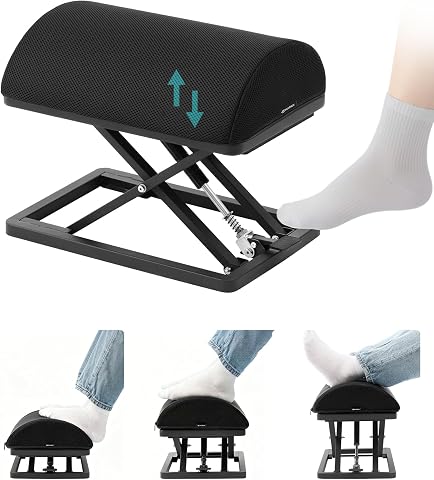
This foot rest adjusts from 2.7 to 13.1 inches with a foot tap, so you can change its height without bending down. It has a carbon steel frame, non-slip pads, and a contoured high-density foam cushion with a removable, washable cover.
Pros:
- Foot-tap height adjustment without bending
- Wide adjustment range for different postures
- Stable carbon steel construction with non-slip pads
- Removable, washable cushion cover
Cons:
- Finger-entrapment risk during operation
- Relatively heavy at 9.5 lb
Best for: People whose feet need extra support while seated
Not ideal for: Work areas with little legroom or frequent chair movement
Bottom line: Match the footrest’s height and footprint to your chair, desk, and available legroom.
Wrist Rest
Wrist support can change how your hands meet the desk while typing and using a mouse. The Ergonomic Mouse Pad with Wrist Support and Keyboard Wrist Rest Set pairs support for both input areas. Before choosing it, check the dimensions of the keyboard rest and mouse pad against your keyboard, mouse, and available desk space.
A common buying mistake is resting the wrists on a pad while reaching or bending the hands sharply to type. Check the set’s height and material details, and consider whether the wrist rests will sit level with your keyboard and mouse. Make sure the mouse pad leaves enough room for your usual mouse movement. Also verify whether the keyboard rest is intended for your keyboard’s size and layout.
Set the keyboard and mouse close enough that your shoulders can stay relaxed, then position the supports where they feel comfortable during pauses. If your hands feel pressed against an edge or your wrists remain bent while working, adjust the input devices and chair before relying on the rests. Positioning and dimensions are key to making a matched set work with your desk setup.
What to look for:
- Keyboard-rest length and height
- Mouse-pad dimensions and usable tracking area
- Materials and surface details for both rests
- Compatibility with keyboard size and layout
- Desk space for comfortable keyboard and mouse placement
Ergonomic Mouse Pad with Wrist Support and Keyboard Wrist Rest Set

This ergonomic set includes a mouse pad and keyboard wrist rest crafted with memory foam for long-lasting support and comfort. The design features a 15-degree slope, massage beads, and a silky fabric surface to promote wrist health and precise control during extended use.
Pros:
- Provides ergonomic support to reduce wrist strain
- Comfortable massage bead design promotes blood flow
- Non-slip PU base ensures stability during use
- Easy to clean and maintain
Cons:
- May be too large for small desks
- Memory foam may flatten over time with heavy use
Best for: People who want support at both input devices
Not ideal for: Setups with compact desks or unusual keyboard layouts
Bottom line: Compare the set’s size and height with your devices and preferred hand position.
Anti Fatigue Mat
A mat can define a standing area and add a cushioned surface beneath your feet. The listed pick is the Secretlab Magnus Pro Electric Standing Desk with Black Leatherette Mat. Its name combines a desk and a mat, so confirm exactly what the listing includes and whether the mat is intended for the desk surface or the floor. That distinction affects how it fits into your setup.
A common mistake is assuming a mat’s name describes its intended use or that it will fit any standing desk. Check the product details for the mat’s dimensions, material, placement, and compatibility. If you want a floor mat for standing, confirm it is designed for floor use and will fit the standing area without interfering with the desk base or chair. If the listing is for a desk and accessory bundle, review which pieces are included.
Measure the area where you stand and consider how the mat interacts with your shoes and floor. Check edges and surface care guidance, and allow enough room to move your feet naturally. Intended placement and dimensions should be clear before buying, especially since the product name also identifies an electric standing desk.
What to look for:
- Whether the listing includes a mat, desk, or both
- Mat dimensions and intended placement
- Material details and care guidance
- Compatibility with desk base and standing area
- Floor fit, edge profile, and room to move
Secretlab Magnus Pro Electric Standing Desk with Black Leatherette Mat

This adjustable-height standing desk has a rectangular black tabletop and a stainless steel base. Its integrated power supply column routes power through a concealed cable in the desk leg, while the magnetic cable management system and included tray help keep cords organized.
Pros:
- Adjustable height supports sitting and standing
- Integrated power supply column routes power through a concealed desk leg cable
- Magnetic cable management and an included tray help organize cords
Cons:
- Requires user assembly
- Weighs 120 pounds
Best for: People seeking the listed desk and leatherette mat combination
Not ideal for: Shoppers looking only for a standalone floor mat
Bottom line: Clarify what the listing includes and confirm mat placement and dimensions before ordering.
Build your setup in a practical order: first address chair and desk fit, then make sure your monitor is positioned appropriately. Add foot support if your feet lack a comfortable resting place, and consider wrist rests and a standing mat after checking that they suit your input devices and floor area. Prioritize the changes that solve the most immediate fit issue.
Small adjustments can make a workspace feel more considered. Measure first, check the product details, and adjust one part of your setup at a time so you can tell what works for you. With a little planning, you can put together a comfortable, functional home office that suits your room and routine.